


Back in 2000, your hard drive was probably tiny and downloading a single song from the internet felt like a marathon. Then came a quiet little file format that didn't just save space; it launched a revolution in how we consume music. That format, of course, is the MP3.
The core reason for its existence was simple: take the huge digital audio format of a CD-quality song and shrink it down by a factor of 10 to 12 without making it sound noticeably terrible. It worked so well that the MP3 became the definitive music file format of the digital age, powering everything from early file-sharing platforms to the very first portable digital music players.
Why is MP3 so common?
Its popularity is a result of a combination of engineering genius and perfect timing. The format was:
Small: Making it fast to download and easy to store in the days of limited bandwidth and tiny hard drives.
Good Enough: The sound quality, while technically imperfect, was indistinguishable from the original to the average listener, especially on consumer-grade speakers or headphones.
Universal: Its open standard eventually led to ubiquitous support. By the time the iPod arrived, every computer, phone, and player knew how to handle an MP3.
Is MP3 Lossy or Lossless?
This question cuts right to the heart of the MP3's cleverness. Is MP3 lossy or lossless? The answer is lossy.
In the world of file compression, we talk about two types:
Lossless Compression (like ZIP or FLAC): This process reduces file size by removing redundant data, but it can perfectly reconstruct the original file bit-for-bit.
Lossy Compression (like MP3 or JPEG): This process achieves much greater size reduction by permanently discarding data that the creators deem "unnecessary."
The trick is how the MP3 decides what to throw away.
How does MP3 compression work?
The MP3 compression algorithm is not just a digital shrinking tool. It takes advantage of a fascinating fact about human hearing: we simply don't hear everything.
The process, known as perceptual audio coding, involves a few key steps:
Frequency Masking: If a very loud sound is playing at one frequency, your ear struggles to hear a much quieter sound at a nearby frequency. The MP3 algorithm identifies these "masked" frequencies and discards the quiet sound, because your brain was already going to ignore it.
Temporal Masking: If a loud noise is followed immediately by a quiet noise, your ear's sensitivity is temporarily reduced, meaning you can't hear that quiet noise right away. The MP3 format removes these momentarily inaudible trailing signals.
Data Quantization: The MP3 algorithm strategically reduces the precision of the less-important audio information.
By applying these masking models, the MP3 format can reduce a file's size by up to 90% while retaining the parts your ear and brain actually perceive as music. It’s brutal, but highly effective.
Bitrate and Quality: The MP3 Sweet Spot
Since MP3 compression is lossy, the amount of data discarded depends on the bitrate.
The bitrate and quality setting is essentially the speed at which the data is played back, measured in kilobits per second (kbps). A CD-quality track operates at a raw, uncompressed rate of 1411 kbps. An MP3 takes this monster and cuts it down.
64 kbps or 96 kbps: This is often referred to as "telephone quality." It’s fine for podcasts or voice recordings, but it usually sounds noticeably muffled or "underwater" for music.
128 kbps: This was the original standard for peer-to-peer sharing and early digital music stores. It was considered the minimum acceptable quality for music, offering a huge file size reduction but often introducing audible artifacts.
192 kbps: This is a solid, high-quality setting that most casual listeners cannot distinguish from a CD. It offers the best balance of file size and quality.
256 kbps to 320 kbps (Max): These are often called "near-CD quality" or "studio quality." The difference between 192 kbps and 320 kbps is usually indiscernible to all but the most dedicated audiophiles with high-end equipment.
If you’re ripping your own music, 320 kbps gives you the largest file, but also the closest experience to the original master.
MP3 vs. WAV and AAC
The MP3's dominance has been challenged over the years by uncompressed classics and more modern, efficient formats. Understanding the differences is key to choosing the right digital audio format for your needs.
MP3 vs WAV
WAV (Waveform Audio File Format) is the raw, uncompressed, unedited audio that comes off a CD (or a professional recording session).
WAV's Advantage: Perfect quality. Since it’s uncompressed, it captures every single detail of the original recording.
MP3's Advantage: File size. An average three-minute song in WAV format is about 30 MB. The same song at 320 kbps MP3 is closer to 7 MB.
So use MP3 vs WAV when storage or streaming is a priority. Use WAV only if you are editing audio professionally or creating a high-fidelity master archive.
MP3 vs AAC (Advanced Audio Coding)
AAC is generally considered the technical successor to the MP3. It was developed as part of the MPEG-4 standard and uses a more advanced psychoacoustic model.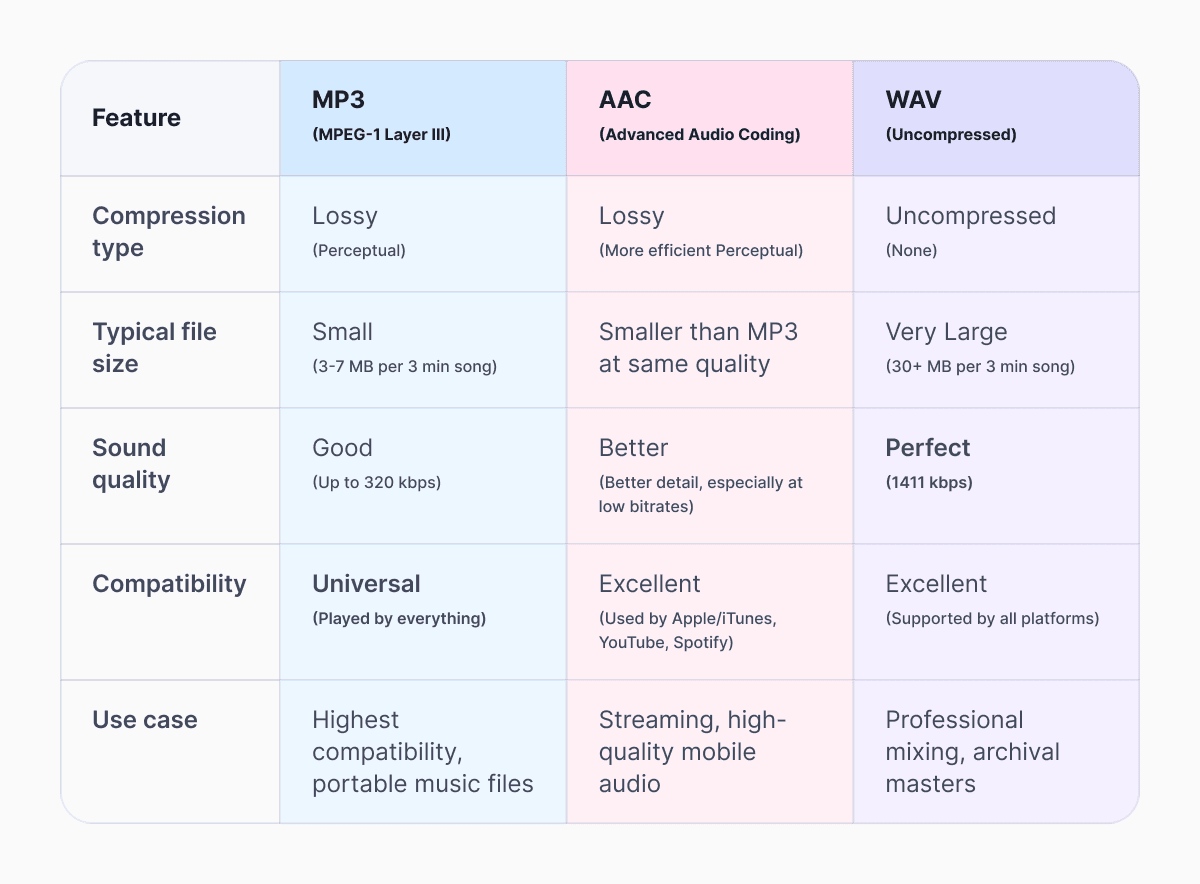
MP3's Advantage: Compatibility. While AAC is widely supported today, MP3 is still the fallback. If you plug a USB drive into a twenty-year-old car stereo or a niche piece of hardware, it will play the MP3 without fail.
The MP3 didn't just give us a digital audio format; it defined the entire structure of the modern music industry. It was the crucial piece of technology that made digital music portable and distributable. While audiophiles may prefer FLAC or AAC, the fact that you can still pull an MP3 file format from 2001 and have it play instantly on your 2025 smartphone is a testament to its enduring design.
So whether you need to shrink your music library or switch formats for better playback, you can achieve the perfect balance of quality and size using the professional tools with Documents Audio Compressor and our full suite of Multimedia Converters.
Latest posts
Glossary
What is a DOCX file, and how do you open one without Word?
Got a DOCX file but no Microsoft Word? Learn what this popular document format is and the easiest ways to open and edit it
Glossary
What is an HTML file, and what should you do with one?
Found an HTML file and not sure what to do with it? Learn what HTML files are and the easiest ways to open, view, and edit them.
Glossary
What is an EPUB file, and how do you open one on your iPhone?
Got an EPUB file on your iPhone? Learn what this popular ebook format is and the easiest ways to open and read EPUB files.