


You’ve probably met a ZIP file on a busy morning.
Maybe a colleague emailed a folder full of documents and everything arrived as a single, mysterious file with a zipper. Or you downloaded an entire photo set from the cloud and it showed up as one neat package. Or a friend sent you a project, and tapping it suddenly revealed a whole stack of PDFs, images, and notes.
That little moment of “Ah, so that’s what was inside” is exactly what ZIP files were designed for.
A ZIP file is a compressed archive — a container that shrinks one or more files into a smaller bundle so they’re easier to store, send, download, and share. It’s one of the oldest, most universal file formats on the internet, and it quietly powers millions of everyday task
But what’s actually happening inside that zipped folder? And how do you open or create one? Let’s walk through it in a simple, modern way.
What a ZIP File Really Is
A ZIP file is a compressed package that stores one or many files in a smaller size. It uses lossless compression, which means nothing is destroyed or degraded during the process.
When you unzip it, every file inside appears exactly as it was — same quality, same structure, same data.
The .zip extension simply tells your device:
“This is a container.”
“There are files stored inside.”
“You’ll need to extract them to use them normally.”
ZIP is supported everywhere: Windows, Mac, ChromeOS, iPhone, Android, Linux. It’s the universal language of bundling and shrinking files.
What Is a ZIP File Used For?
ZIP files solve three everyday problems in a clean, almost invisible way.
1. Making files smaller
ZIP removes repeated patterns from files and reduces size without losing any data. This gives you:
- Faster uploads and downloads
- Easier sharing over email
- Less storage usage
2. Keeping many files together
Think of ZIP as a suitcase. You can fill it with:
- Entire folders
- Photo collections
- Project files
- Documents + media + notes
- Anything you need to ship as a single item
3. Preserving all details
It keeps:
- File structures
- Folder nesting
- Metadata
- Permissions
Despite how common they are, ZIP files feel a little magical: they condense digital clutter into something tidy and lightweight.
How ZIP Compression Works
ZIP looks for repetition — repeated text, repeated patterns, repeated bytes — and stores them in a more efficient way.
It doesn’t throw anything away. Instead, it stores instructions like “this part repeats 20 times” instead of writing the whole thing again.
When you unzip the archive, your device rebuilds the original files with perfect accuracy. That’s why ZIP is used for critical documents, professional files, libraries, and anything where precision matters.
How to Open a ZIP File on Windows, Mac, and Mobile
Opening a ZIP file is usually as simple as double-clicking.
On Windows
- Double-click the ZIP to view its contents
- Click Extract All
- Choose where to save the unzipped files
On Mac
- Double-click the ZIP
- macOS instantly extracts it into a new folder
On Android
Open the ZIP in the Files app → Extract
(or use any file manager)
The process is simple everywhere — except, historically, on the iPhone. Apple added ZIP support to the Files app, but the experience is basic and limited. If you want the fastest, most intuitive way to unzip files on iOS, there’s a much better option.
The Easiest Way to Open ZIP Files on iPhone: Documents by Readdle
Opening ZIP files on an iPhone becomes effortless when you use Documents by Readdle, the best file manager and media viewer for iPhone and iPad. Millions of people rely on it because it handles all file types gracefully and unzips archives instantly.
How to open a ZIP file on iPhone with Documents
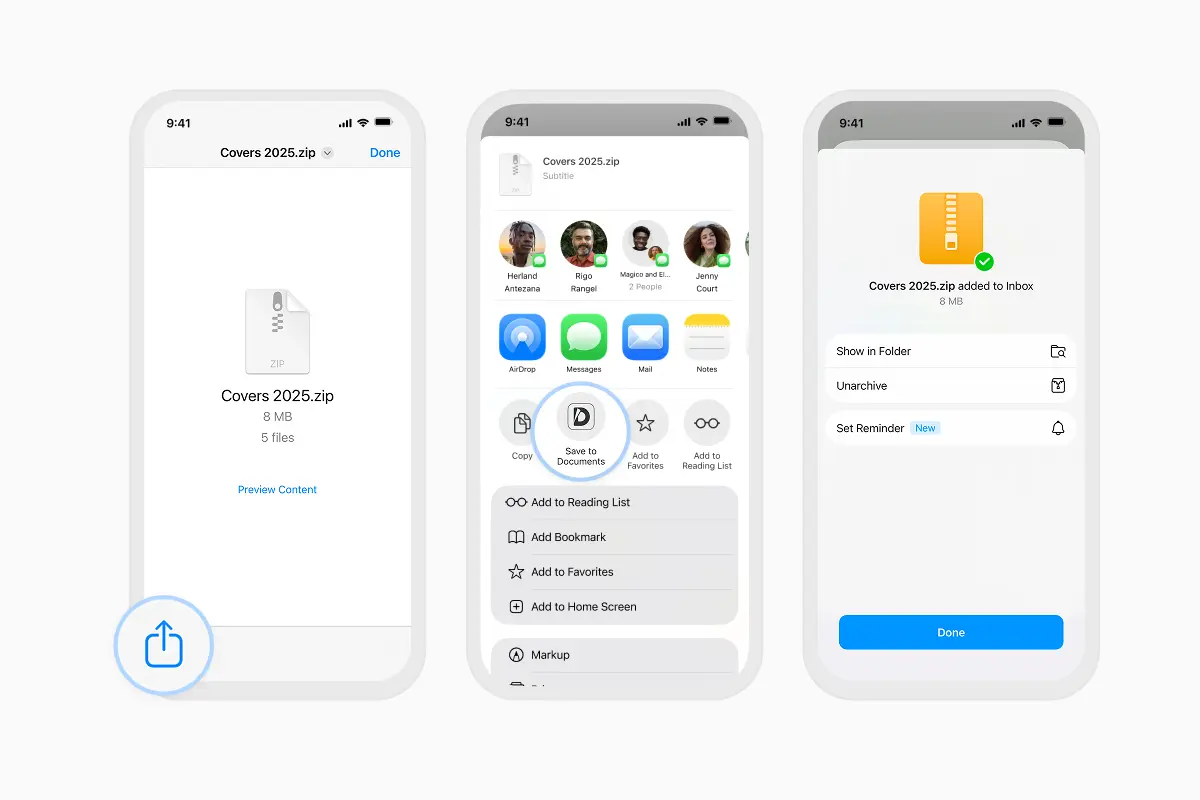
- When you receive a ZIP file in Mail, Messages, or any app, tap it.
- Tap the Share button.
- Select Save to Documents.
Documents opens your ZIP instantly. You’ll see everything inside — photos, PDFs, audio, videos — neatly organized.
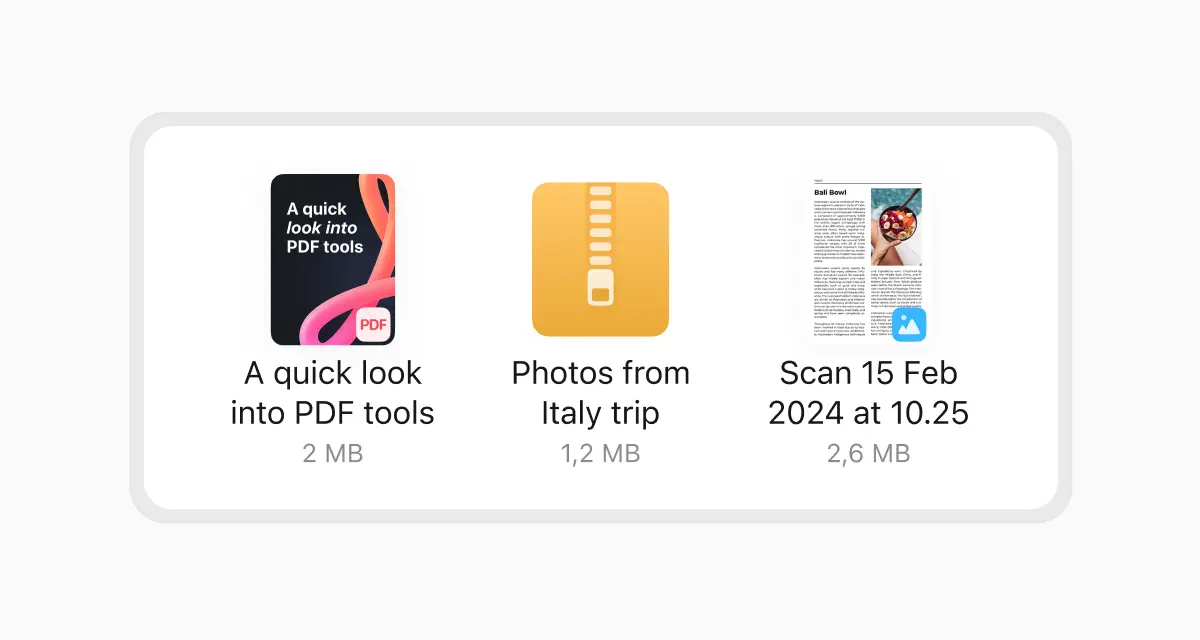
How to extract a ZIP file
Just tap the archive.
Documents unzips it automatically.
Large photo sets, scanned PDFs, entire project folders — it handles everything in a flash.
Whether the archive contains hundreds of photos, a folder full of PDFs, or mixed media, Documents handles it in a snap. There’s no waiting, no extra tools, no strange error messages.
What Files Can You Open in Documents?
One of the reasons Documents is so popular is that it doesn’t just unzip files — it becomes your central hub for everything you store on your iPhone. You can read ebooks, review PDFs, browse photos, play music, watch videos, and manage your folders all in one place.
Documents supports a wide range of file types, including office documents, EPUB ebooks, PDFs, text files, nearly all popular image formats, most video formats, common audio formats, and both ZIP and RAR archives. It’s designed to replace the clutter of having six or seven different apps for different file types.
How to Add Files to Documents
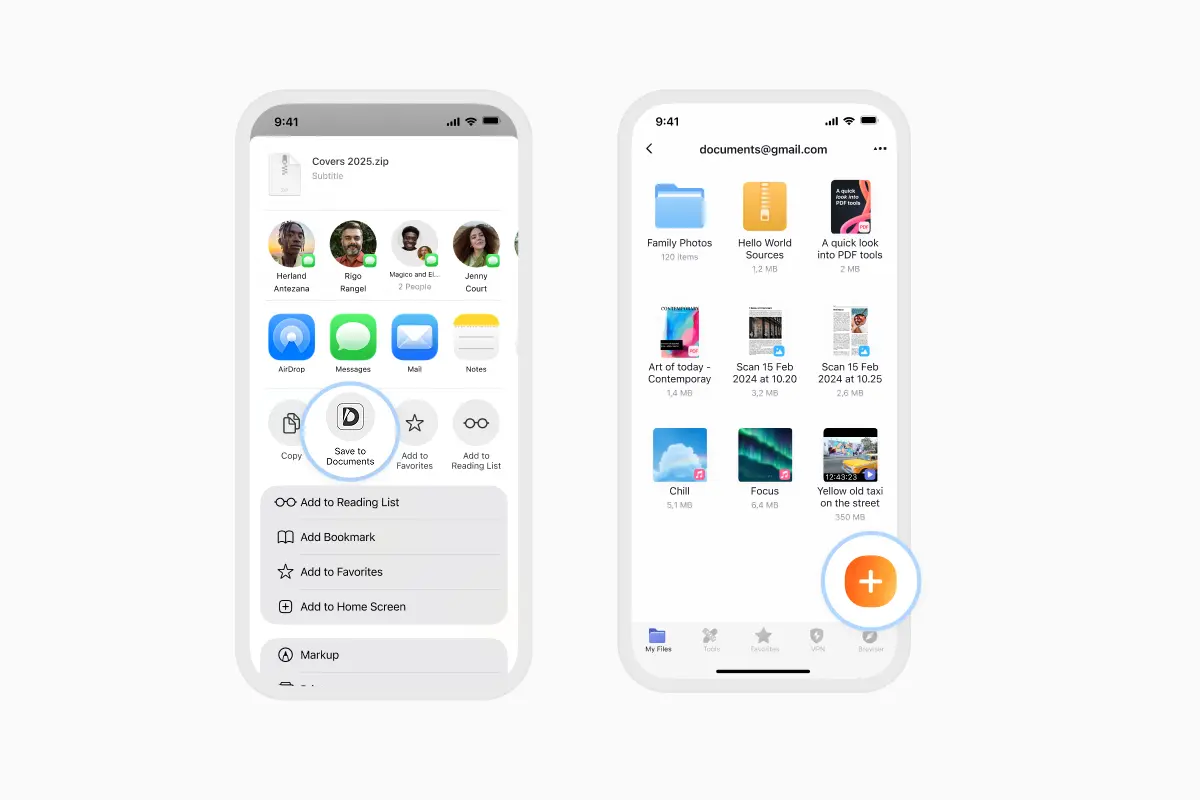
Method 1: Import from the app
- Open Documents
- Tap the purple + button
- Choose to import from Files, Photos, cloud services, or your computer
Method 2: Use the Share button
When you open a file in any app, tap Share → choose Documents.
It imports instantly.
How to Create a ZIP File
Creating a ZIP file is just as straightforward as opening one.
On Windows, you can right-click a file or folder and choose “Send to → Compressed (zipped) folder.
On Mac, right-click and choose “Compress.”
On iPhone or iPad, the Files app lets you select items, tap the More button, and choose “Compress,” though the experience is basic.
You can also compress files directly in your browser using the compression tools at Documents.io, which let you create ZIP files instantly on any device — no software installation needed.
Is a ZIP File the Same as a PDF or JPEG?
No. A ZIP is a container, not a content type.
- A PDF is a document.
- A JPEG is an image.
- A ZIP is a locked suitcase that can hold PDFs, JPEGs, videos, code, spreadsheets — anything.
You can’t “open” a ZIP like a normal document because it’s a package. You extract it.
The Bottom Line
ZIP files are one of the simplest and most powerful tools for moving data around: they make files smaller, keep folders intact, and travel easily across any device or platform. Whether you’re downloading a huge project, sharing documents with a client, or simply archiving your own files, ZIP is the format that keeps everything neat and portable.
And if you’re on iPhone, Documents by Readdle makes that whole process smoother — opening ZIPs instantly, unzipping in one tap, and giving you a single place for all your files, no matter their type.
Latest posts
Glossary
What is a DOCX file, and how do you open one without Word?
Got a DOCX file but no Microsoft Word? Learn what this popular document format is and the easiest ways to open and edit it
Glossary
What is an HTML file, and what should you do with one?
Found an HTML file and not sure what to do with it? Learn what HTML files are and the easiest ways to open, view, and edit them.

Glossary
What is an EPUB file, and how do you open one on your iPhone?
Got an EPUB file on your iPhone? Learn what this popular ebook format is and the easiest ways to open and read EPUB files.