


You’ve probably seen an “.ogg” file in the wild without realizing it. Maybe it was bundled with an indie game soundtrack, sitting in a sound-effects folder, or lurking behind the scenes of a streaming app.
OGG has always been the scrappy counterpoint to the mainstream audio world: open, flexible, and engineered for the internet age. But it’s also frequently misunderstood, because “OGG” is less a single audio format than a container that can carry different kinds of audio.
Let’s untangle what OGG actually is, where Ogg Vorbis fits in, and how it stacks up against MP3 and FLAC in the real world.
OGG isn’t a codec - it’s a container
The simplest way to think about OGG is as a wrapper. Technically, Ogg is a multimedia container format maintained by the Xiph.Org Foundation, designed for efficient streaming and for holding one or more encoded streams plus metadata.
So why do people say “OGG audio” as if it’s one thing? Because the most common pairing is Ogg Vorbis: audio encoded with the Vorbis codec and placed inside an Ogg container. Vorbis itself is positioned as a general-purpose, high-quality lossy codec that’s open and royalty-free, which was built specifically to compete with patented formats.
You can also run into Ogg files carrying other codecs (like Opus for voice and low-latency audio), which is why two “.ogg” files don’t always behave identically across devices and apps.
What does OGG stand for?
Despite how it looks, OGG isn’t an acronym. It doesn’t officially “stand for” anything like MP3 does. The name “Ogg” is commonly traced back to “ogging,” jargon from the multiplayer game Netrek, and it later became the umbrella name for the container format.
In other words: it’s a name, not initials.
A quick origin story: why OGG exists at all
OGG and Vorbis grew up in the era when digital audio was dominated by formats surrounded by patents and licensing.
Xiph.Org’s mission has been to keep core internet multimedia from being locked up by private interests, and Vorbis was the audio spearhead. It was created as an open alternative anyone could implement without paying fees.
That “no royalties, no patent headaches” posture is a huge part of why OGG became popular in open-source software, games, and web-adjacent workflows.
It’s also why you’ll still see it used in places where developers care about licensing simplicity as much as sound quality.
Is OGG better than MP3?
Sometimes—depending on what you mean by “better.”
In pure engineering terms, Vorbis has long been considered more efficient than MP3 at a given bitrate, which can translate to either better sound at the same file size or the same sound at a smaller file size.
Xiph’s own Vorbis overview explicitly positions it as comparable to AAC-class codecs and “higher performance” than MP3 in the same general use case.
However, audio “better” is also about compatibility and convenience. MP3 remains the universal passport: phones, cars, TVs, smart speakers, ancient MP3 players—everything speaks MP3. Ogg Vorbis support is common in many modern apps and platforms, but it’s not guaranteed in the way MP3 is.
A practical way to frame it: if you’re choosing a lossy format for high-quality streaming audio, Ogg Vorbis is a legit contender—popular enough that Spotify historically used Ogg Vorbis (often cited up to 320 kbps for higher quality tiers). But if you’re sharing files with random devices, MP3 still wins on frictionless playback.
Where FLAC fits in: different job, different tradeoffs
If MP3 and Ogg Vorbis are about throwing away data intelligently (lossy compression), FLAC is about keeping it all. It’s lossless compression—smaller than WAV, but bit-for-bit faithful to the source—making it ideal for archiving a music library or storing masters you’ll transcode later.
That’s why comparisons like “OGG vs FLAC” can feel like arguing a backpack is better than a suitcase. They’re built for different priorities. Ogg Vorbis is a “good enough to great” delivery format; FLAC is a preservation format. Mainstream audio explainers typically group Ogg Vorbis with MP3/AAC as lossy, and FLAC as the lossless step-up.
Can iPhones play OGG files?
This is where OGG’s reputation gets complicated.
Historically, Apple’s core music ecosystem hasn’t treated OGG as a first-class citizen—older iTunes-era guidance and many user reports boil down to “convert it or use another player.” In practice, plenty of iPhone users play OGG files just fine by using third-party apps (VLC is the usual suspect), or by converting OGG into something Apple-native like AAC/M4A or MP3.
But the story is changing on the web. Apple has publicly said that Safari 19 added support for Ogg Opus and Ogg Vorbis in WebKit, and browser compatibility trackers show iOS Safari support improving in recent versions. That helps if your main encounter with OGG is streaming in a browser—it doesn’t automatically mean every built-in Apple media workflow treats .ogg as a drop-in file you can AirPlay everywhere.
So the safest summary is: iPhones can play OGG in some contexts and apps, but if you want universal “tap-and-play” behavior across Apple devices, converting is still the least annoying path.
How do I convert OGG to MP3?
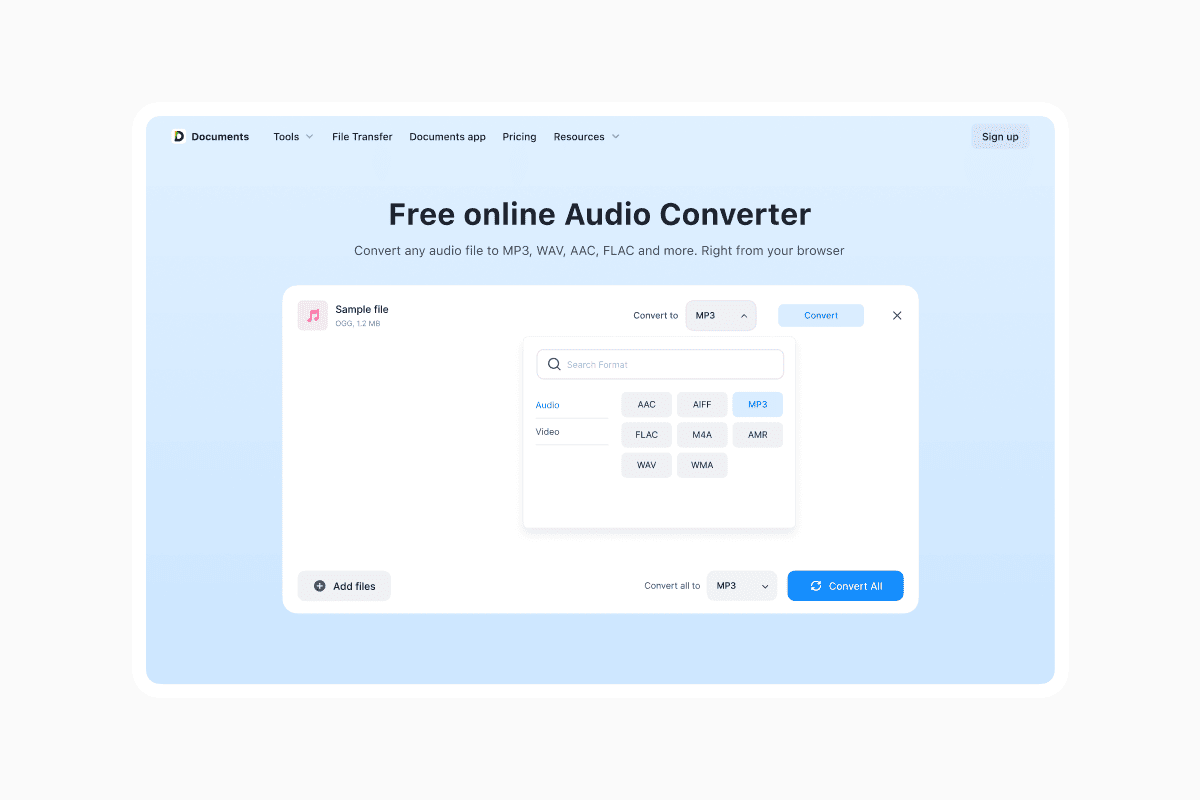
Conversion is usually painless, and you don’t need anything exotic. On a computer, free tools like VLC, Audacity, or the command-line workhorse ffmpeg can decode Vorbis and re-encode to MP3 (or, if you’re living in Apple land, AAC/M4A is often the more natural destination). If you’re already on a Mac, Apple’s own Music app supports converting tracks in your library into other formats via its import/conversion settings, which can be a straightforward way to generate a compatible copy.
If you’d rather not install anything, Documents.io’s online tools can handle quick OGG-to-MP3 conversions in the browser, and the Documents.io app is a handy option when you want to manage files and run conversions on the go—especially if you’re juggling audio between devices.
One important reality check: converting from OGG (lossy) to MP3 (lossy) is a transcode, not a magical upgrade. You’re recompressing already-compressed audio, which can introduce additional artifacts. If you still have the original lossless source (like FLAC or WAV), convert from that instead.
Why OGG still matters in 2025
OGG’s superpower is that it’s open—no royalties, no patent toll booths—and it was built with streaming in mind. For developers, that’s not just philosophy; it’s reduced risk and simpler distribution.
For listeners, it often shows up as “this sounds good and loads fast,” especially in software ecosystems that prioritize open formats.
The catch is that mainstream convenience still rules the world. MP3 is everywhere, AAC is deeply embedded in Apple workflows, and FLAC has become the default “lossless but practical” choice for people who care about fidelity.
Ogg Vorbis sits in a slightly more niche sweet spot: great quality-per-bit and open licensing, with compatibility that’s good—but not universally effortless.
If your goal is maximum device support, go MP3 (or AAC for Apple-heavy sharing).
If your goal is archiving and future-proofing, go FLAC. And if your goal is a high-quality, open-source audio format that’s been battle-tested for streaming and software distribution, Ogg Vorbis remains one of the smartest answers hiding behind a three-letter extension.
Latest posts
Glossary
What is a DOCX file, and how do you open one without Word?
Got a DOCX file but no Microsoft Word? Learn what this popular document format is and the easiest ways to open and edit it
Glossary
What is an HTML file, and what should you do with one?
Found an HTML file and not sure what to do with it? Learn what HTML files are and the easiest ways to open, view, and edit them.
Glossary
What is an EPUB file, and how do you open one on your iPhone?
Got an EPUB file on your iPhone? Learn what this popular ebook format is and the easiest ways to open and read EPUB files.