


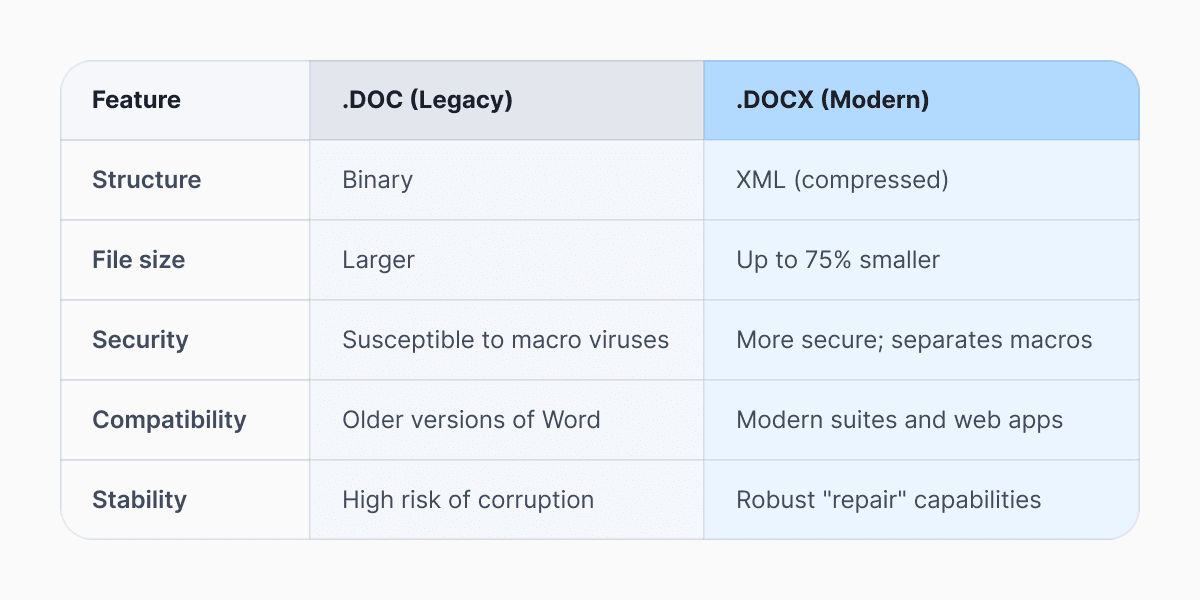
A DOCX file is the mainstay of document formats, essentially serving as the universal language for text-based information. It is the default Word document format used by Microsoft Word since Office 2007. Unlike the older DOC format, DOCX files are structured as compressed ZIP archives containing XML files, images, and other resources.
In simple terms, DOCX is more open, compact, and compatible than the old DOC format. The format is designed to improve file recovery, reduce file size, and enhance compatibility across platforms. It’s supported by a surprisingly wide ecosystem of apps across Windows, macOS, Linux, iOS, Android, and the web. You can open a DOCX file in Word, in a browser, in a free office suite, or even convert it without installing anything at all.
In this guide, we’ll break down what a DOCX file actually is, which programs support the DOCX format, how to view DOCX without Word, how to edit DOCX online for free, and what to do if you can’t open a DOCX file.
DOCX vs DOC: why the change mattered
The difference between DOC and DOCX comes down to structure, size, and openness. While the old .doc format was a proprietary secret held tightly by Microsoft, the .docx format is based on the Office Open XML (OOXML) standard. This openness is exactly why so many apps can now open these files without paying Microsoft a licensing fee.
 How do I open a DOCX file without Microsoft Word?
The most common hurdle users face is trying to view DOCX without Word installed on their machine.
- Windows users can use WordPad or the modern Microsoft 365 (Office) dashboard.
- Mac users have TextEdit or Apple Pages, which can display the text and basic formatting of a .docx file in a pinch.
- LibreOffice Writer is another strong choice if you prefer offline access. It’s free, open source, and compatible with most DOCX features. It's a strong cross-platform fallback. It’s frequently recommended in community forums and professional guides because it supports most DOCX features and remains free.
- If you only need to view DOCX files without Word, not edit them, you can use Microsoft Word Viewer alternatives, open the file in your browser via Word Online, or convert it to PDF using a DOCX converter.
Can Google Docs open DOCX files?
Google Docs is one of the easiest. Simply upload your DOCX file to Google Drive, then open it in Google Docs. The platform automatically converts it for editing in your browser. Formatting typically carries over well, though complex layouts, custom fonts, advanced macros, or intricate templates may shift slightly. For everyday resumes, reports, essays, and business documents, Google Docs handles DOCX smoothly.
This "Office Editing" mode preserves the original file extension, making it easy to download and return to a collaborator who uses Microsoft Word. This has effectively turned Google Docs into a powerful, free online DOCX tool. Google provides official guidance on supported file types, including DOCX.
Which programs support DOCX format today?
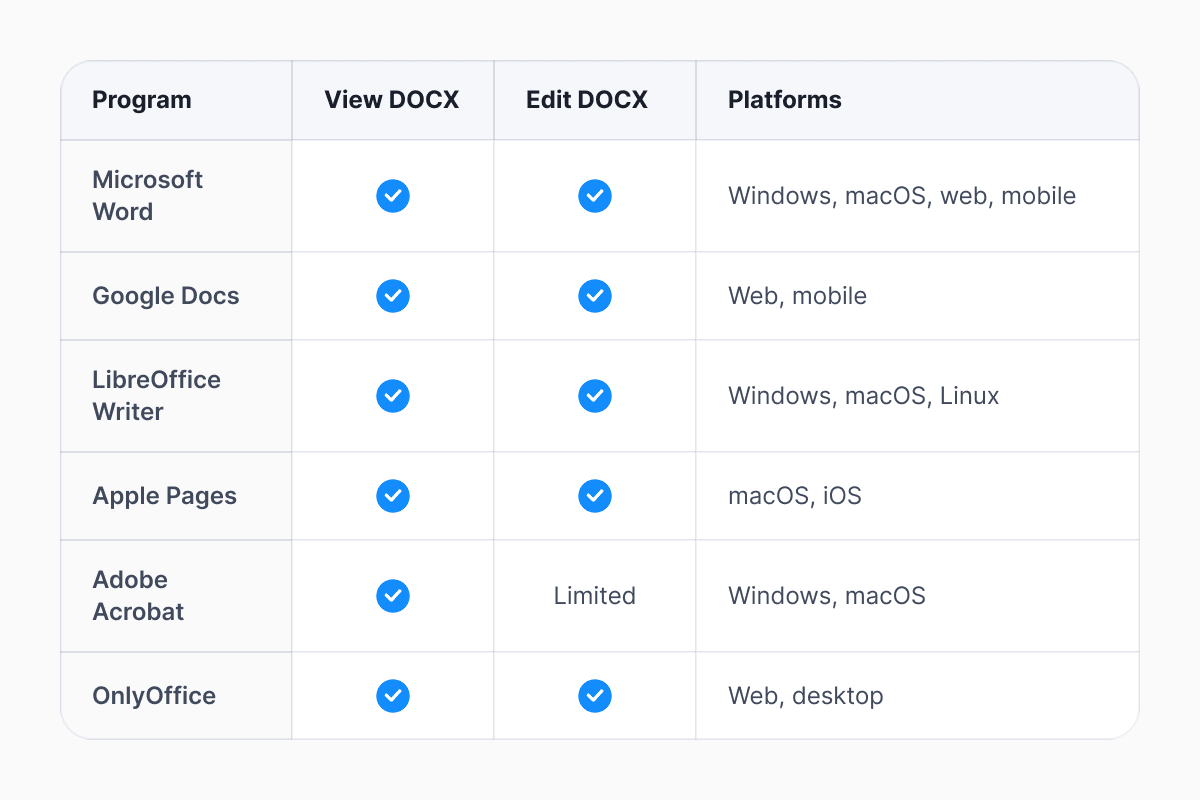
The list of software that can handle these files is extensive. While Microsoft Word remains the gold standard for high-end formatting and advanced features, it is far from your only option. For those on a budget or looking for open-source alternatives, LibreOffice Writer and Apache OpenOffice provide a nearly identical experience to Word without the subscription fee.
If you are a Mac user wondering how to open Word files natively, Apple’s Pages app handles .docx files with impressive grace. Simply double-clicking the file usually triggers Pages to import the content, though you should always do a quick scan to ensure complex layouts or specific fonts didn't shift during the transition. For mobile users on Android or iOS, the official Microsoft Office mobile app, Google Docs, and WPS Office are the top-tier choices for viewing and light editing on the go.
This level of cross-platform support is one reason DOCX remains the dominant Word document format in business, education, and publishing.
Why can’t I open a DOCX file?
If you double-click a file and nothing happens, or you receive an invalid file error, there are usually three common reasons:
First, the file extension might be wrong; ensure the file actually ends in .docx and hasn't been accidentally renamed.
Second, the file itself may be corrupted. Because DOCX files are compressed archives, partial downloads or transfer errors can render them unreadable. In some cases, renaming the file extension to .zip and extracting its contents can help recover text elements.
Third, you may not have a default app installed or assigned to that file type. To fix this, install Microsoft Word, LibreOffice Writer, or use Google Docs. Alternatively, right-click the file, select "Open With," and choose a program like Google Chrome, LibreOffice, or Pages.
Security restrictions can also block access, particularly in corporate environments where macros or external content are disabled.
How to convert DOCX to PDF or other formats
There are times when you want to lock a document so it can't be edited, which is where a DOCX converter comes in. If you are using a modern word processor, you don't need a third-party website to do this. In Word, LibreOffice, or Pages, simply go to File > Export and select PDF. If you are working within the Google ecosystem, File > Download > PDF Document will do the trick instantly
If you don’t have dedicated software, Documents Converter tools can handle the task. However, for sensitive documents, it’s generally safer to convert locally rather than upload files to unknown web services.
Can I edit a DOCX file online for free?
If you find yourself on a public computer or a guest laptop, you can edit DOCX files online for free without installing any software. Beyond the web application of Word, you can upload to Google Docs. Microsoft Word is a streamlined version of the desktop app available for free through a Microsoft account. It is often the best choice for maintaining 100% formatting accuracy, as it uses the same rendering engine as Word's paid version. Other notable web-based editors include ONLYOFFICE and Zoho Docs, both of which offer robust compatibility for the Word document format.
In a world built on digital documents, DOCX remains the universal language of text. Whether you need a DOCX viewer, a DOCX converter, or a full-featured editor, you have more choices than ever. And now you know exactly which program is used to open .docx files—and why the answer is bigger than just Word.
Selecting the right tool depends on your specific needs:
- For professional publishing: Microsoft Word is still the leader for complex indexing, bibliographies, and advanced "Track Changes" functionality.
- For collaborative writing: Google Docs is the industry standard for real-time, multi-user editing without versioning headaches.
- For privacy-conscious users: LibreOffice Writer is an excellent offline alternative that doesn't require cloud connectivity or subscriptions.
- For quick previews: Online viewers like OneDrive's file viewer allow you to check the contents of a file in any browser without a download.
Latest posts
Glossary
What is a DOCX file, and how do you open one without Word?
Got a DOCX file but no Microsoft Word? Learn what this popular document format is and the easiest ways to open and edit it
Glossary
What is an HTML file, and what should you do with one?
Found an HTML file and not sure what to do with it? Learn what HTML files are and the easiest ways to open, view, and edit them.

Glossary
What is an EPUB file, and how do you open one on your iPhone?
Got an EPUB file on your iPhone? Learn what this popular ebook format is and the easiest ways to open and read EPUB files.