


If you’ve ever gone looking for the best format for sound quality, you’ve probably fallen into the FLAC vs WAV rabbit hole. Both promise lossless audio. Both are beloved by audiophiles. Both show up in gear forums right before arguments break out.
Under the hype, the truth is pretty simple: FLAC and WAV contain the same underlying audio data, but they package it very differently. That difference affects file size, metadata, compatibility, and how you actually use your music or projects day to day.
Let’s start with the quick lossless audio comparison, then drill into the questions people actually ask.
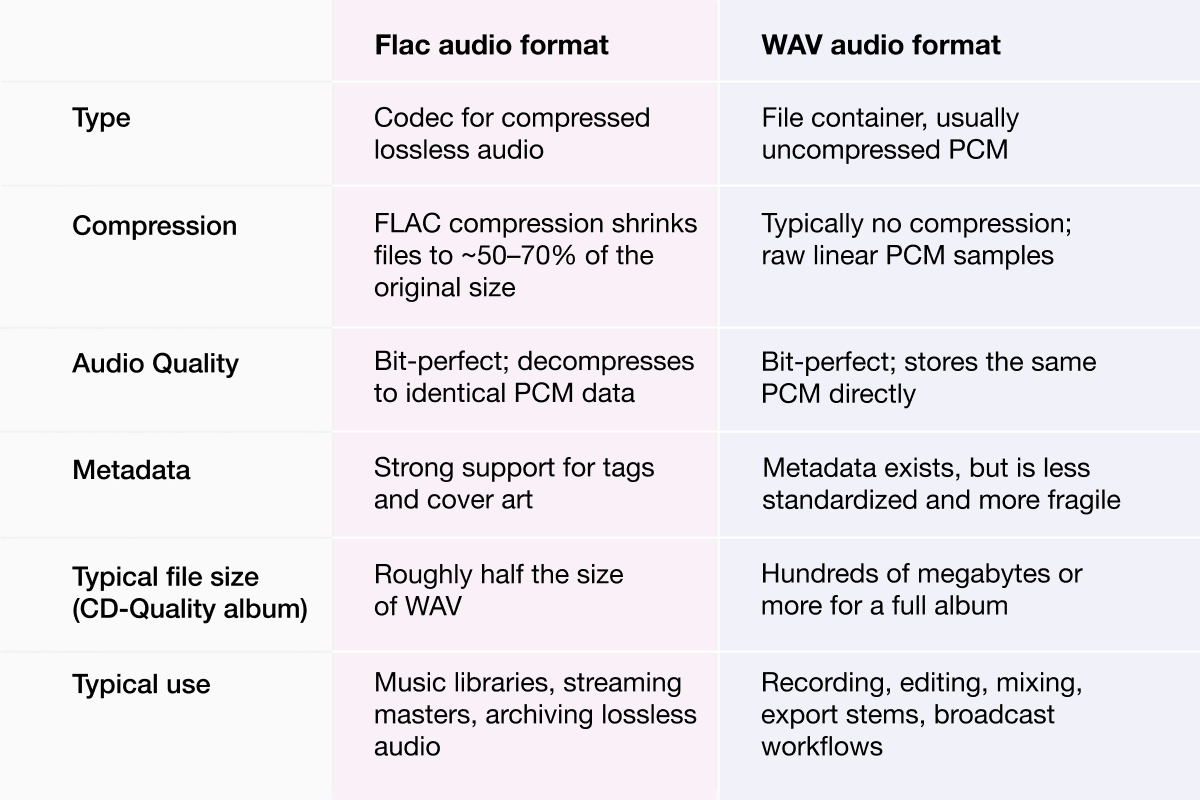
What’s the difference between FLAC and WAV?
On a technical level, the difference is about how the audio is stored, not how it sounds.
FLAC — the Free Lossless Audio Codec — is a format designed specifically for lossless compression. It analyzes the waveform, finds patterns and redundancy, and encodes them efficiently so the file gets smaller. When you play it back, the decoder reconstructs the exact original PCM stream, sample for sample.
WAV, by contrast, is a container format from the early ’90s that usually just holds uncompressed PCM: the raw amplitude values for every sample in the audio. It’s simple, predictable, and deeply baked into Windows and pro audio software.
So the short version of “What’s the difference between FLAC and WAV?” is:
- FLAC is compressed but lossless.
- WAV is uncompressed (or lightly structured) audio, usually in PCM.
Under the hood, though, they can represent the same signal.
Does FLAC sound the same as WAV? Is FLAC better quality?
This is the audiophile bar-fight question.
If you take a high-quality WAV file and encode it to FLAC at standard settings, then decode that FLAC back to PCM, you get the exact same bits you started with. That’s literally what “lossless” means.
So when people ask “Does FLAC sound the same as WAV?” the technical answer is yes. In a properly configured system, a FLAC file and a WAV file created from the same master, with the same bit depth and sample rate, are indistinguishable in blind tests because they decode to the same waveform.
Is FLAC better quality than WAV? No. Neither format has an inherent quality advantage. Both can store 16-bit CD audio, or 24-bit and higher sample rates for hi-res material. FLAC has become the de facto lossless choice for hi-res music downloads and streaming because it’s efficient and open, not because it sounds “better” than WAV.
If you hear a difference, it’s almost always down to something else: how the files were exported, what your player is doing, or whether one file has gone through an extra resampling or DSP stage.
Why is WAV file size so large?
Once you know that WAV usually stores uncompressed PCM, the file size question answers itself.
CD-quality stereo audio is 16-bit, 44.1 kHz. That’s 44,100 samples per second, each sample 16 bits, times two channels. Multiply it out and you end up at roughly 1.4 Mbps, or around 10 MB per minute of audio.
A full-length album in WAV can easily weigh in at several hundred megabytes. Broadcasters and studios accept that cost because uncompressed audio keeps the signal path simple and predictable; many radio chains and production workflows still standardize on WAV for exactly that reason.
FLAC compression tackles that by packing the same data more efficiently, often cutting the size by 40–50% while remaining bit-perfect.
Which format is best for music production?
In the studio, WAV is still the default answer.
Most DAWs, plugins, and hardware recorders are designed around uncompressed PCM data in WAV (or AIFF). The software can stream those samples straight from disk, scrub around the timeline, and process effects without constantly decoding compressed frames in the background. That simplicity turns into stability, which is why pro workflows from broadcasters to mastering houses still lean heavily on WAV.
If you’re tracking vocals, recording a band, exporting stems, or sending a project to another engineer, the path of least resistance is “stick with WAV.” It avoids compatibility surprises and reduces CPU overhead when sessions get heavy.
FLAC can appear in production, but usually at the edges: for example, when you’re sending reference mixes or roughs around, or archiving completed sessions in a more compact form rather than keeping every take as WAV forever.
Is FLAC truly lossless?
There’s now a formal IETF specification for the FLAC format that defines exactly how the codec works and guarantees that decoding reconstructs the original PCM signal without loss.
“Lossless” isn’t just marketing language here. It means a decoded FLAC stream matches the original input bit-for-bit. That’s what makes FLAC safe for archiving and for workflows where you might transcode later into other audio file formats such as MP3, AAC, or OGG: you can always go back to the FLAC as your clean master.
FLAC vs MP3: where the real quality line is
A lot of confusion arises from conflating the FLAC vs. WAV debate with the FLAC vs. MP3 debate.
MP3 (and AAC, OGG, etc.) is lossy. It throws away information based on a psychoacoustic model to dramatically reduce file size. Once that data is gone, it’s gone; converting an MP3 back to WAV doesn’t magically restore what was discarded.
In other words: if you care about maximum quality, the real line is lossless vs lossy, not FLAC vs WAV. Both FLAC and WAV sit on the “full-quality” side of that line; MP3 and friends are on the convenience side.
Which format is better for archiving audio?
For archiving, FLAC usually wins.
Because FLAC is a lossless audio format with built-in compression, it lets you store bit-perfect masters in significantly less space than WAV. Add in robust metadata — including tags, artwork, and even technical notes — and it becomes a very library-friendly container for long-term storage.
A common modern workflow looks like this: keep your live DAW projects in WAV, because your editing software loves uncompressed audio, then export final mixes and masters to FLAC for archiving and for your listening library. That way you get the best of both worlds: clean, simple project files while you’re working; compact, richly tagged files when you’re done.
Can I convert FLAC to WAV without losing quality?
Yes. As long as you move between FLAC and WAV — both lossless formats — conversion is transparent.
Encoding a WAV to FLAC applies lossless compression. Decoding that FLAC back to WAV reverses the process and reconstructs the original PCM. There’s no generational loss the way there is if you repeatedly re-encode an MP3.
In practical terms, that means you can safely:
- Rip or record to WAV in your production environment.
- Convert those files to FLAC for storage and listening.
- Convert any FLAC back to WAV later if some piece of gear or software demands it.
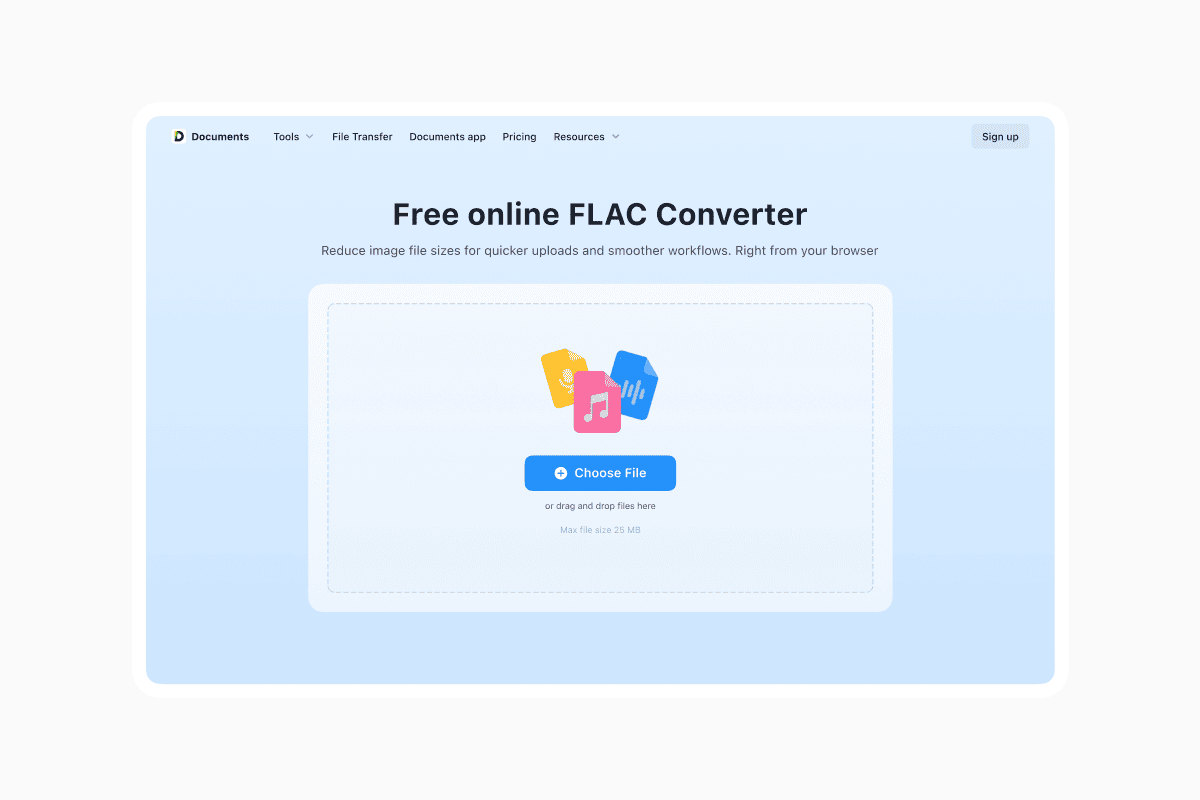
The audio you hear will be the same. You can quickly and easily convert between these two files types using online tools such as documents.io. You can convert from FLAC to WAV or WAV to FLAC.
So which should you actually use?
Once you strip away the forum mythology, FLAC vs WAV isn’t really a philosophical question. It’s about context.
If you’re making audio — recording, editing, mixing — WAV is the format that keeps your DAW happy and your workflow boring in the best way.
If you’re keeping or playing audio — building a lossless library, downloading hi-res albums, or archiving finished projects — FLAC is the efficient, metadata-friendly container that makes much more sense.
Sound quality doesn’t decide this one. Storage, compatibility, and workflow do.
Latest posts

Knowledge Base
Video file formats explained: MP4, MKV, AVI and more
Learn the difference between video file formats (MP4, MKV, AVI, MOV, WebM) and codecs (H.264, H.265, AV1). Find out which format is best for social media, professional editing, and universal compatibility in 2026.

Knowledge Base
The beginner photographer’s guide to file conversion (RAW, JPEG, TIFF, PNG)
A beginner-friendly guide to converting RAW, JPEG, TIFF, and PNG photos. Learn quality tradeoffs, export settings, and smart archiving habits for web and print.
Knowledge Base
How to make a GIF: simple steps to create and share loops online
Making a GIF is simple: trim a short moment from a video, convert it, and save the loop. Whether you’re using a browser-based converter like Documents.io or an app, the key is to keep it short, clean, and seamless for easy sharing anywhere.