


If you have ever opened a spreadsheet, you have almost certainly worked with an XLSX file without giving the extension a second thought.
It’s the format Microsoft Excel has used by default since 2007, and it is everywhere: budgets, invoices, data exports, school reports, and more. But what actually is it, and what do you do if you can’t open one? Here is everything you need to know.
What is an XLSX file?
XLSX is the file format used by Microsoft Excel for spreadsheets. The extension was introduced with Microsoft Office 2007 as part of a big shift in how Office documents are saved. Before that, Excel used the older .xls format, a closed, binary file that only Microsoft’s software could fully read. XLSX changed that.
Despite looking like a single file, an XLSX is a ZIP archive containing a set of XML files. The spreadsheet data, formulas, formatting, and charts are all stored as separate, human-readable files bundled together. It sounds complicated, but the practical upside is significant: because the format is open and standardized, dozens of applications beyond Excel can read and write it – including free ones.
What is an XLSX file used for?
You’ll run into XLSX files constantly if you work with data. Since 2007, Excel’s default format has pretty much become the standard for structured data. You’ll see it everywhere:
- Budgeting and financial modeling – XLSX supports complex formulas, named ranges, and multiple linked sheets.
- Data analysis – pivot tables, charts, even conditional formatting, and data validation, help in data analysis.
- Reporting – almost every BI tool exports to XLSX, because Excel is a universal standard in business environments.
- Data exchange – XLSX format helps transfer structured data between different applications, like CRM and accounting systems.
- Academic and scientific work – researchers depend on XLSX for storing results, performing statistical analysis, and creating charts for publications.
- XLS vs XLSX: what changed and why it matters
If you have ever received a file ending in .xls instead of .xlsx, you have encountered Excel’s older format. You can open both in Excel, and on the surface, they look identical. But under the hood, they are quite different. And the newer .xlsx format wins on almost every count.
[for design] A visual representation of a comparison: XLS (Excel 97) vs XLSC (Excel 2007)
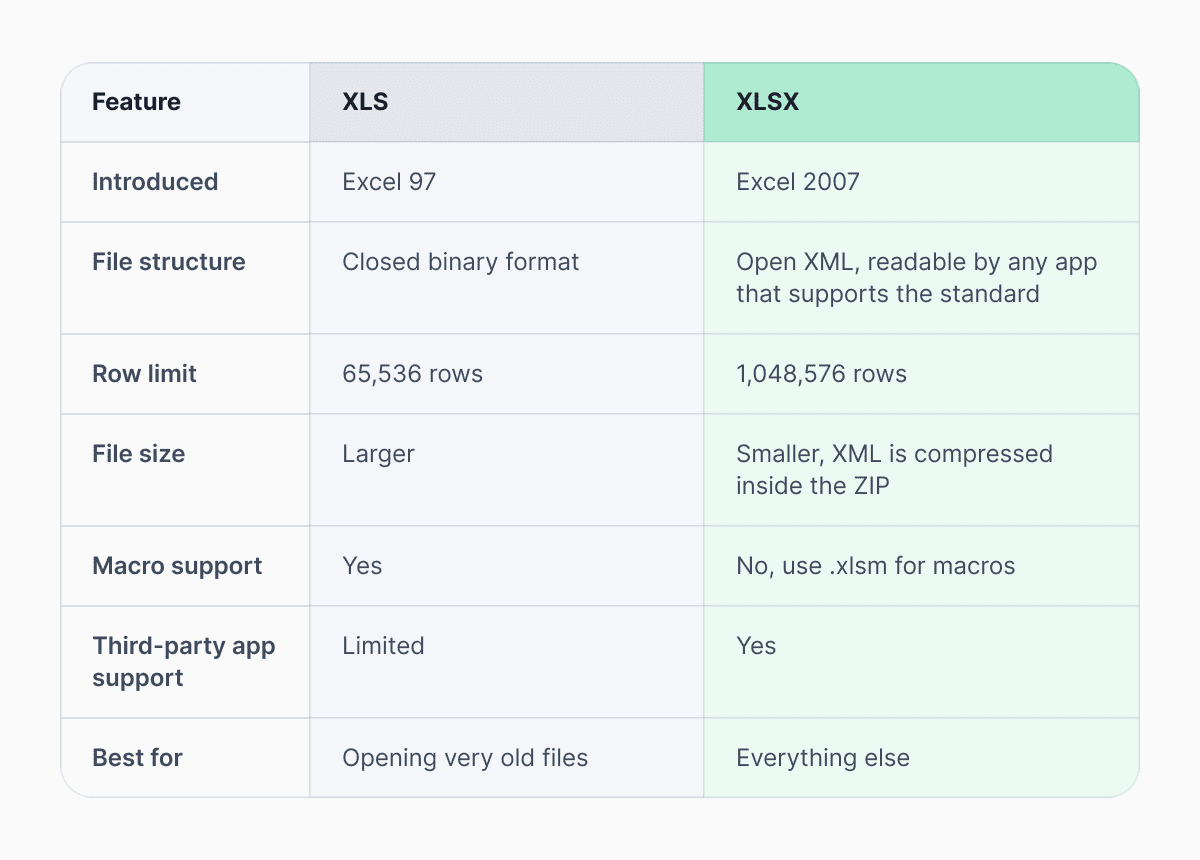 Use XLSX for everything unless you specifically need to share a file with someone running a very old version of Excel. XLS is a legacy format and should generally be avoided for new work.
Do XLSX files support macros?
No, they don’t contain macros, and that is the deliberate decision made by Microsoft. The company redesigned the file format in 2007.
Macros are small automated scripts that can run inside a spreadsheet, auto-filling data or running calculations at the click of a button. These scripts are useful for experienced users, but most people who work with spreadsheets never need them.
The more important reason Microsoft excluded macros from XLSX is security. The older .xls format could be used to carry malware hidden inside macro scripts – a genuine problem that affected a lot of users. So when Microsoft redesigned the format, they made a clean split: XLSX files cannot contain macros at all. If a spreadsheet needs them, it has to be saved as a separate file type – .xlsm.
In this way, when receiving such a file on your computer, you will be able to easily distinguish between them.
Which program opens XLSX files?
The easiest answer is Microsoft Excel; however, you can find various other alternatives, including free ones. Excel Online allows you to edit and view XLSX files online using your Microsoft login without any software installation. The same can be achieved using Google Sheets; you just need to upload the file from your Google Drive and edit it. For offline editing, the best free choice would be LibreOffice Calc if you use Windows, Mac, or Linux.
If you have an iPhone or iPad, Microsoft Excel (free trial version) and Apple Numbers are two solid options. Numbers will give you the most accurate results when you open the spreadsheet, though very complex formatting may not carry over perfectly. On Android, Excel and Google Sheets are both solid options.
How to open an XLSX file without Excel
You don’t need to pay for Excel to open an XLSX file. Google Sheets is one of the easiest routes. Simply upload the file to Google Drive, double-click it, and it opens automatically. Excel Online works the same way if you prefer to stay in Microsoft’s ecosystem. Both are free.
Alternatively, for a more robust offline solution, try using LibreOffice Calc. It supports even the most complicated XLSX files very effectively.
How to convert an XLSX file to CSV
CSV (Comma-Separated Values) is a stripped-down version of your spreadsheet without any formatting, formulas, or charts. It just has the values in plain text. It is the format that databases, APIs, and most data tools prefer when importing information.
In Google Sheets, go to File > Download > Comma-separated values. You can also use Documents.io’s online XLSX to CSV converter. Just upload your file directly to your browser and convert for free, no account needed.
If you have an XLS file, you can also convert it to CSV using Documents.io’s online converter.
One important thing to keep in mind: once you convert to CSV, the formatting and formulas are gone for good. Make sure you keep your original XLSX if you might need it again.
XLSX file: frequently asked questions
Is an XLSX file safe to open?
Yes. Because XLSX files cannot contain macros, they cannot run any code when you open them. The format to watch out for is .xlsm. If you receive one of those unexpectedly, treat it with the same caution you would a program file from an unknown sender.
Why can’t I open my XLSX file?
There can be several reasons. You might have an outdated version of Excel (pre-2007), no spreadsheet app installed at all, or a file that got corrupted in transit. Try opening it in Google Sheets or LibreOffice – if neither works, the file itself may be damaged.
Can I open an XLSX file on my phone?
Yes. Excel and Google Sheets are both free on iOS and Android and handle XLSX files well. Apple Numbers on iPhone is also a good option for most spreadsheets.
What is the difference between XLSX and XLSM?
XLSM is the macro-enabled version of XLSX. Everything is the same except that XLSM files can contain VBA scripts that run automatically. If you need macros, save as XLSM. If you don’t, stick with XLSX – it is safer and more compatible.
Latest posts
Glossary
SVG file format explained: what it is, how it works, and when to use it
Learn what the SVG file format is, how it compares to PNG and JPG, how to open or edit SVG files, and how to convert SVG images to JPG or PNG using documents.io

Glossary
What is a TIFF file? A guide to this high-quality image format
Learn what a TIFF file is, when to use it for high-quality images and printing, how it compares to JPEG and PNG, and how to open and convert TIFF files.
Glossary
What is a JPEG file? Inside the world’s most popular photo format
JPEGs are everywhere, from social media uploads to camera rolls. Here’s what the format actually does, why it became the standard for photos, and where it still shines today.