


RAR files are like tightly packed suitcases. You throw in a bunch of files and folders, compress the whole collection, lock it up — and carry it around as a single bundle. If you’ve ever downloaded a large collection of photos, a video pack, documents, or an app bundle from the internet, chances are you’ve encountered a .rar file.
RAR feels a bit more mysterious than ZIP files. ZIPs open almost everywhere. RARs often demand extra software. So what is a RAR file, why does it exist, and how can you open it? Let’s unpack the full story.
What is a RAR file
A RAR file is a compressed archive created with a proprietary format developed by WinRAR’s author. It bundles together one or many files and compresses them into a single file. The compression usually produces smaller archives than ZIP — meaning you save storage space and speed up transfers.
RAR supports advanced features like splitting an archive into multiple parts (e.g. “file.part1.rar”, “file.part2.rar”) — useful when you need to break a very large download into smaller pieces. RAR also supports optional password protection and error correction.
In short: RAR is designed for efficient archiving, safe transfers, and reliable unpacking — especially for large or complex file sets.
How does RAR compression work
When you create a RAR archive, the compressor examines the files, finds redundant data and patterns, and stores them more compactly while remembering how to rebuild everything later.
When you extract (or “unarchive”) the RAR, the software restores every file exactly as it was. Nothing is lost and folder hierarchy is preserved. That’s why RAR archives remain a trusted format for backups, software distribution, shared media, and large file transfers.
Because RAR uses proprietary compression, built-in OS support is rare — you usually need an app that understands RAR.
RAR vs ZIP
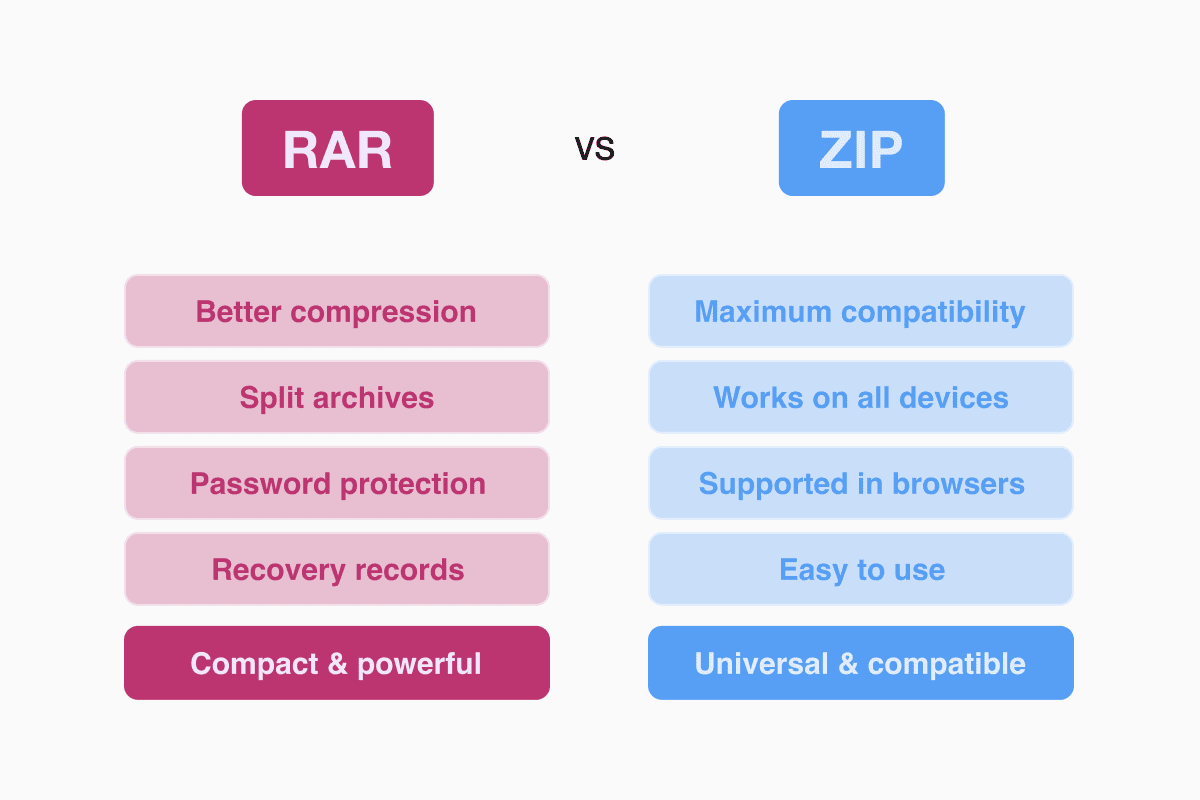
ZIP is the universal format. It’s supported natively by Windows, macOS, many phones, and even some browsers. That makes ZIP ideal when compatibility matters.
RAR, on the other hand, often produces smaller archives, handles split volumes, and supports password protection and recovery records — making it more powerful for large or sensitive file sets.
If you want maximum compatibility: ZIP.
If you want compact archives or multi-part downloads: RAR — but only if you or your recipients have appropriate tools.
How to open or extract a RAR file on desktop
On Windows, you will need a program like WinRAR, 7-Zip, or PeaZip — free tools that can read and extract RAR archives. Once installed, you right-click the archive and choose “Extract” or “Open archive.”
On macOS, unzip tools like The Unarchiver or Keka work well. Just double-click the RAR or open it from within the app to extract its contents.
On Linux, many archive managers support RAR, or you can use command-line tools. Extracting restores all files and folder structures intact.
How to open a RAR file on iPhone or iPad with Documents by Readdle
Mobile operating systems often lack built-in support for RAR archives. That’s why a powerful file manager matters.
Documents by Readdle is optimized to handle archives in a snap. According to the official support article, the app can unarchive any compressed .zip or .rar file simply by tapping it.
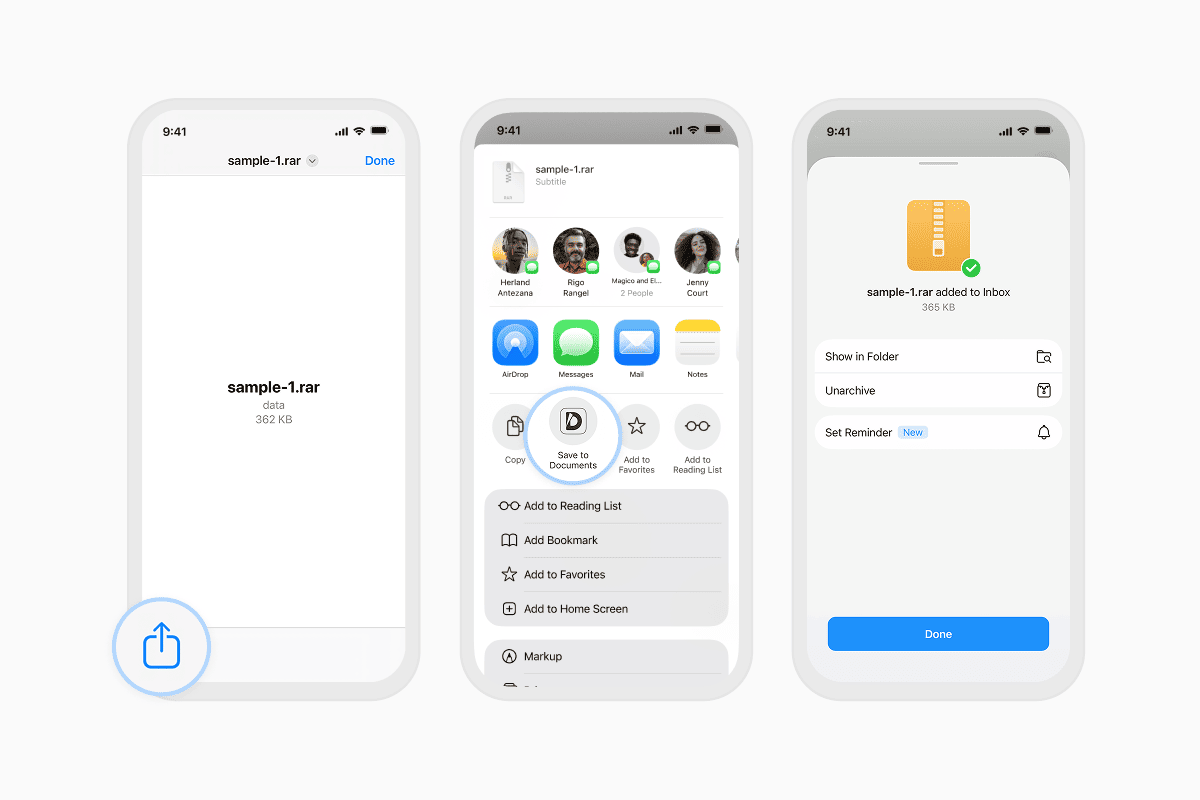
Here’s how to open a RAR on iPhone with Documents:
- Receive or download the .rar file — via email, messenger, web browser or cloud storage.
- Tap the file → choose Share → Save to Documents (if coming from another app).
- Inside Documents, tap the archive. The app automatically extracts the contents and places them in the same folder.
- If you don’t need the original archive anymore, you can delete it — the extracted files remain safe.
This makes Documents by Readdle a top choice for handling RAR archives on mobile, especially if you regularly work with mixed documents, media, or downloaded archives. App Store+1
Can you convert RAR to ZIP — or extract RAR online
Yes. If you need a more broadly compatible archive, you can extract the RAR archive on a computer (or via a tool), then re-compress the files as ZIP. Many archive tools allow this easily.
If you don’t want to install software, there are online converters such as Documents.io that let you upload an image and download a JPG version, with 10 free actions per day.
Are RAR files safe to open
A RAR file by itself is not dangerous — it’s just a container. However, like any downloaded archive, you should watch what’s inside. If it contains executables or unknown content from untrusted sources, treat it with the same caution you’d give any downloaded file. Always inspect contents after extraction and run antivirus scans if needed.
Why you might not open a RAR without special software
Because RAR is proprietary. That means most operating systems don’t support it natively. Apps like 7-Zip, PeaZip, The Unarchiver or Documents by Readdle are necessary to extract these archives — that’s simply how the format is licensed.
ZIP, by contrast, is an open format and built into most OSes by default.
When RAR is especially useful
- Large file sets you want to compress as much as possible
- Collections split into multiple parts (for easier download or sharing)
- Backups or archives needing optional password protection and recovery features
- Mixed folders with many sub-folders, media, documents or installers
For day-to-day sharing of small folders, ZIP may suffice — but RAR shines when you need efficiency, flexibility, and extra compression power.
Bottom line
A RAR file is a robust, efficient archive format built for packing, compressing and transferring large files or complex folder structures. It compresses better than ZIP, supports splits, and can be password-protected — but to open it, you’ll need a capable extractor.
On a desktop, WinRAR, 7-Zip, PeaZip or The Unarchiver do the job. On iPhone or iPad, Documents by Readdle makes handling RAR files simple: just tap and extract.
Latest posts
Glossary
What is a DOCX file, and how do you open one without Word?
Got a DOCX file but no Microsoft Word? Learn what this popular document format is and the easiest ways to open and edit it

Glossary
What is an HTML file, and what should you do with one?
Found an HTML file and not sure what to do with it? Learn what HTML files are and the easiest ways to open, view, and edit them.
Glossary
What is an EPUB file, and how do you open one on your iPhone?
Got an EPUB file on your iPhone? Learn what this popular ebook format is and the easiest ways to open and read EPUB files.