


TXT files are so ordinary that you probably haven’t thought about them in years. They are the little notes developers scatter across folders, the configuration files powering your apps, the shopping lists you write in a hurry, the README signatures that quietly explain what a mysterious project does.
They are everywhere, and yet almost invisible.
Let’s fix that.
So… what actually is a TXT file?
A TXT file is the simplest kind of digital document. It stores plain text. No fonts, no bold, no tables, no images, no formatting glue behind the scenes. Just characters on a page. That simplicity is the whole point. A TXT file is tiny, fast to open, and readable on almost every device ever made. It is the format you choose when all you need is the content, clean and unstyled.
You can think of it as the digital equivalent of a scrap of paper. Not fancy, not decorated, but endlessly practical.
Why do TXT files exist at all
TXT files survive because they solve a universal problem. Sometimes you don’t need layout or formatting. You need the raw information. And nothing beats plain text when you want something that opens instantly, syncs cleanly, and cannot break because of hidden formatting quirks.
A TXT file is ideal for notes, logs, scripts, lists, documentation, debugging output, data meant for a program rather than a person, or anything that should remain readable twenty years from now. The format is so simple that even your toaster could probably open it.
Which program opens a .txt file
Short answer: almost anything with a screen.
On Windows, a TXT file opens in Notepad. That tiny blue notepad icon has been around longer than most people in the office and still does the job. You double-click the file, it appears instantly, and you start typing.
On macOS, TXT files open in TextEdit. TextEdit is capable of more complex documents, but when you open a .txt file, it strips everything down to pure text. Clean, minimal, ready to edit.
On Linux, there is an entire family of editors. From simple graphical tools like Gedit or Kate to terminal favorites like nano or vim, they all speak TXT fluently.
On phones, TXT files open in any basic viewer. But if you want actual editing or file management, built-in apps tend to feel cramped. This is where Documents by Readdle becomes the natural choice.
Opening and editing TXT files on iPhone
TXT files behave differently on mobile. The Files app can preview them, but editing is limited and organizing them is even harder. If you deal with notes, scripts, code snippets, lists, or documentation on your phone, you need something that feels closer to a real file manager.
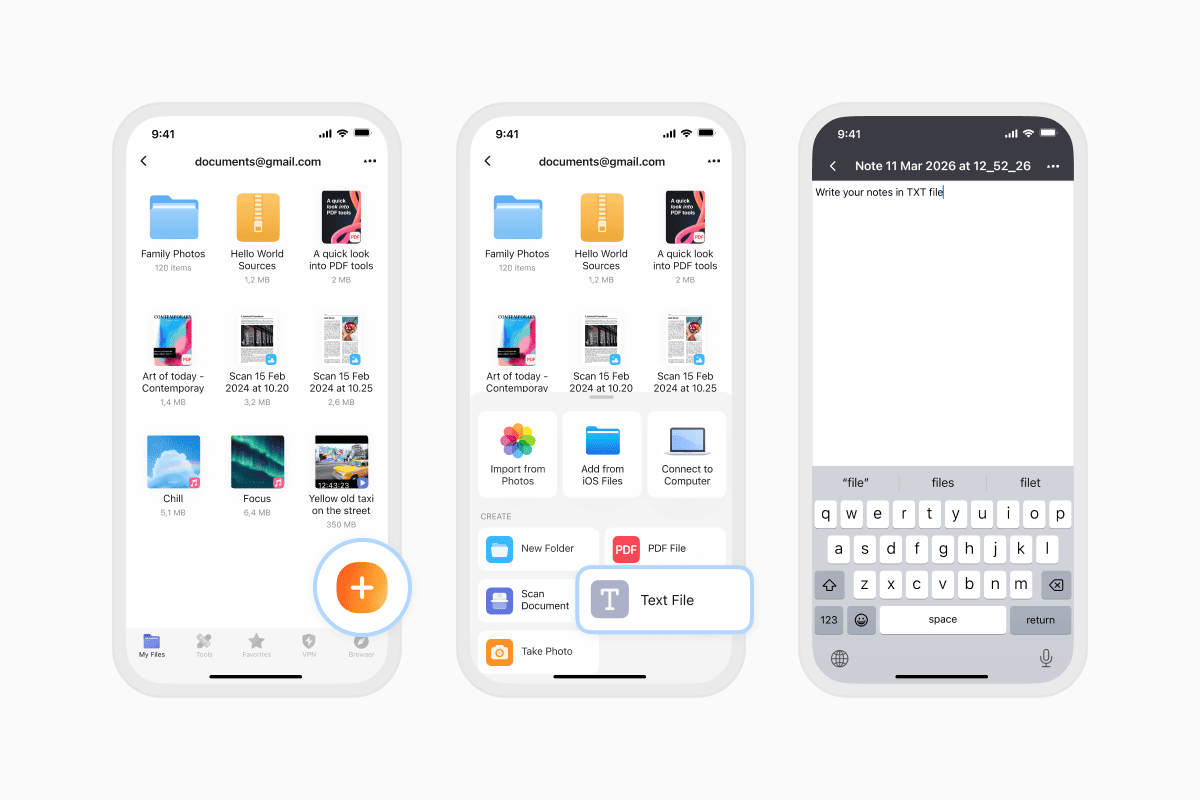
Documents by Readdle fills that gap. You can open a TXT file from Mail, Messages, WhatsApp, Telegram or any app. Just tap the file, choose Share, then Save to Documents. The file lands instantly in your library. Tap it and your text is ready to read or edit.
Documents includes a built-in Text Editor, so creating a TXT file is just as simple. Open the app, tap the purple plus button, pick Create Text File, and you get a blank page that behaves exactly like Notepad or TextEdit. You can keep everything organised in folders, import files from cloud storage, or drag in entire projects from your computer. It’s the closest thing to a desktop-style text workflow you’ll find on iPhone.
Can you open a TXT file in Word or Google Docs
Absolutely. Word and Google Docs both understand plain text. When you open a TXT file in either app, the content appears immediately. Just remember that if you start adding fonts, headings or tables, you will need to save in another format like DOCX. TXT does not know what bold means.
How to create a TXT file
On Windows
Right-click your desktop or a folder → New → Text Document.
Rename the file, open it, and start typing.
On Mac
Open TextEdit, choose Format → Make Plain Text, write your content, and save as .txt.
On iPhone or iPad (Documents by Readdle)
This is one of the most intuitive ways to create text files on mobile.
- Install or open Documents.
- Tap the orange + button.
- Choose Create Text File.
- Write your text and save it — Documents stores it immediately in your file library.
Documents supports folders, tagging, cloud sync, and file transfers, making it a powerful home for all your text files on iOS.
Online
Open any online text editor, write your content, and save it as .txt
TXT vs Other File Types
TXT is sometimes confused with other text-based formats, but it’s important to know the differences:
- TXT vs Word (.docx): Word files contain formatting, styles, images, and layout. TXT contains none — just text.
- TXT vs RTF: RTF supports formatting; TXT does not.
- TXT vs CSV: CSV is structured for data tables; TXT is free-form.
- TXT vs Markdown (.md): Markdown includes special symbols for formatting; TXT is raw.
If you need simplicity and guaranteed readability, TXT is ideal. If you need styling, tables, or layout, use a richer format
Are TXT files safe to open
Yes. TXT files contain only characters, not executable code. They cannot run scripts or hide viruses. If you open a TXT file and see something strange, the worst case scenario is that the content is confusing, not harmful.
Why a TXT file might not open
If a TXT file refuses to open, it is usually mislabeled. Some apps save data files with a .txt extension even though the content isn’t human-readable. Sometimes the file uses an unusual encoding that your default editor doesn’t understand. And sometimes the file is simply corrupted. But most TXT files open instantly and without drama.
Other formats you may encounter
Once you get into text-heavy workflows, you’ll meet other plain-text adjacent formats. Markdown (.md) for structured writing. YAML and JSON for configuration. Log files. Shell scripts. CSV spreadsheets. They are all part of the same minimalist family. They just add small conventions on top of plain text.
If you need pure text with no rules, TXT remains the cleanest choice.
So… which program should you use
For quick viewing: any device works.
For simple edits on a computer: Notepad or TextEdit.
For heavier editing: VS Code, Sublime Text, Notepad++, BBEdit.
For mobile editing and file management: Documents by Readdle.
If your workflow includes PDFs, ZIP archives, scripts, notes and images alongside TXT files, Documents becomes your all-purpose hub.
Bottom line
A TXT file is the digital world’s simplest building block. It is light, durable, readable everywhere and impossible to break. Whether you use it for notes, code, logs, scripts or simple reminders, it gives you pure content with zero friction.
And if you work with TXT files on iPhone or iPad, Documents by Readdle gives you the same superpower your computer has. Open, edit, create, organise and store text files in one clean space, right alongside everything else you keep on your device.
Latest posts
Glossary
What is a DOCX file, and how do you open one without Word?
Got a DOCX file but no Microsoft Word? Learn what this popular document format is and the easiest ways to open and edit it

Glossary
What is an HTML file, and what should you do with one?
Found an HTML file and not sure what to do with it? Learn what HTML files are and the easiest ways to open, view, and edit them.

Glossary
What is an EPUB file, and how do you open one on your iPhone?
Got an EPUB file on your iPhone? Learn what this popular ebook format is and the easiest ways to open and read EPUB files.