


An ODT file is an OpenDocument Text file. It is the native file format for OpenOffice and LibreOffice, two of the most popular free alternatives to Microsoft Office. Unlike proprietary formats owned by a single corporation, ODT is part of the OpenDocument Format (ODF) family, an XML-based standard maintained by an international community to ensure that your documents remain accessible regardless of which software company remains in business.
It functions almost exactly like a Word document, supporting everything from basic bold text to complex tables and nested images. The primary tools used to create and open these files are LibreOffice Writer and Apache OpenOffice. Because these suites are free and cross-platform, they have become the default choice for millions of users worldwide and are favoured by public-sector institutions. However, you aren't limited to open-source software. Most modern word processors have built-in filters to handle the ODT file extension, including Apple Pages and various mobile document viewers.
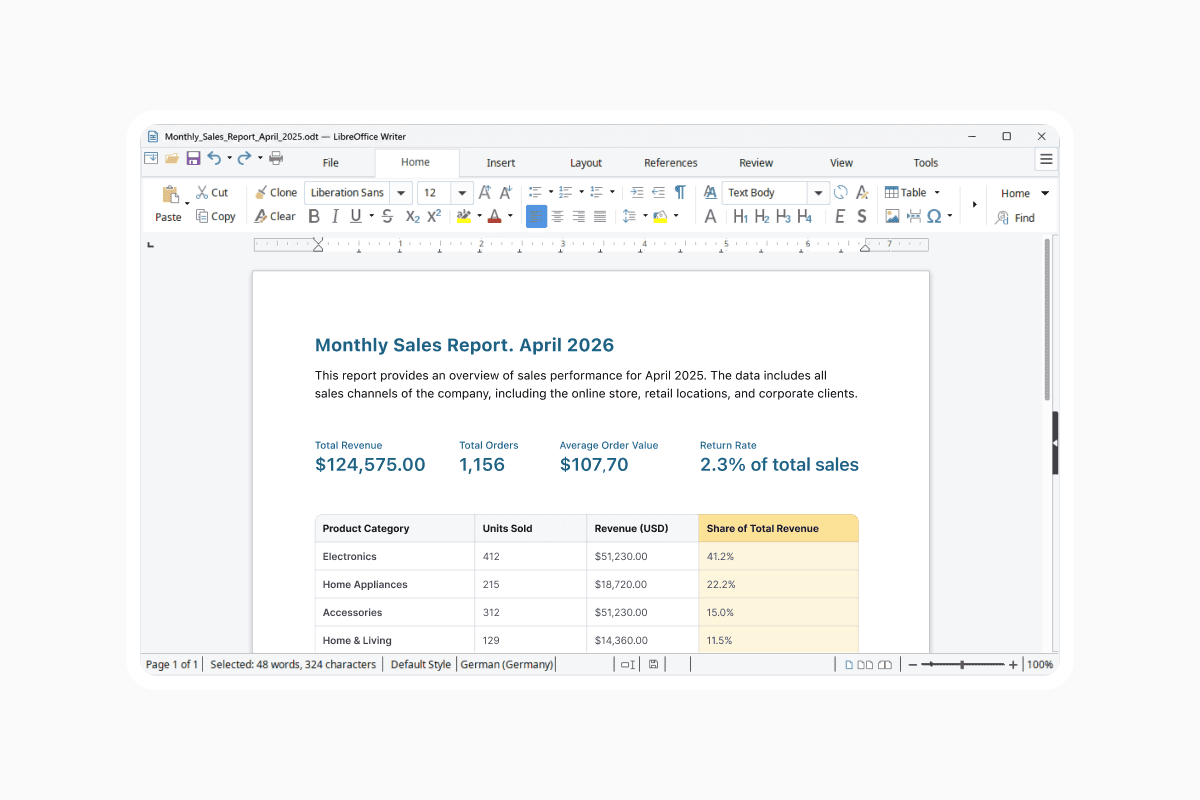
How do I open an ODT file in Microsoft Word?
There was a time when opening an ODT file in Microsoft Word felt like a gamble with your formatting. Thankfully, since the 2010s, Microsoft has integrated ODF support directly into the Office suite.
To open an ODT file in Word, you simply go to File > Open and select your document. Word will automatically convert the file into a readable format. While most basic formatting will remain intact, you may notice slight shifts in complex layouts or specific macro functions. If you plan to collaborate with someone using Word, it is often best to save your final version in the recipient's preferred format to ensure full ODT compatibility.
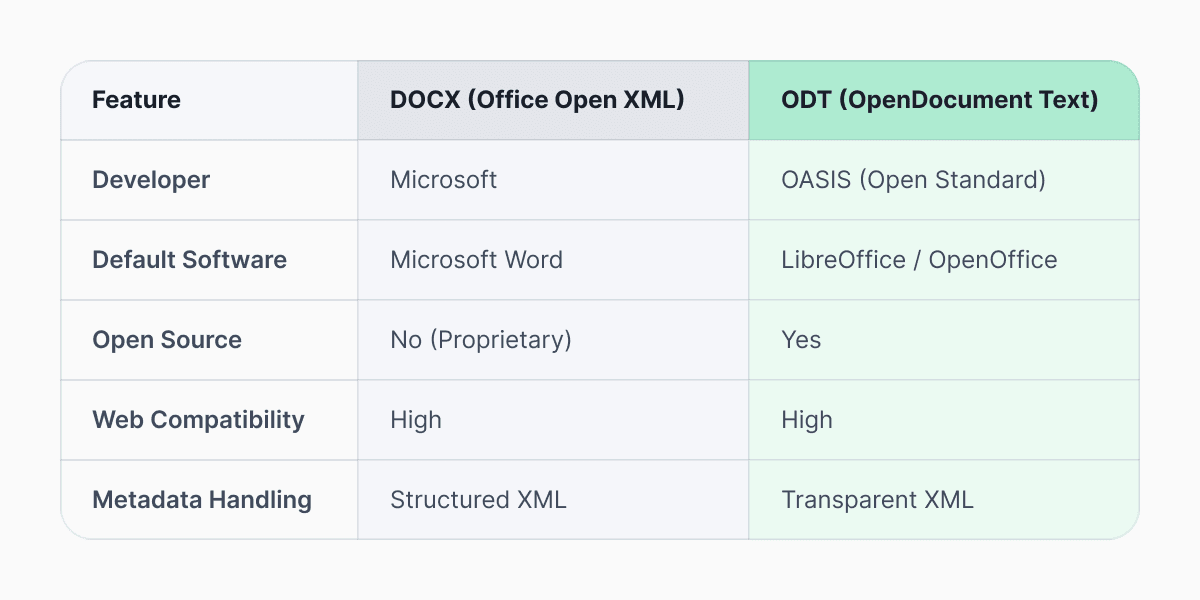
Is ODT the same as DOCX?
ODT and DOCX are different formats that serve the same purpose. Both are XML-based document formats. Both support rich text, images, tables, and styles. Both are compressed file packages under the hood. DOCX is a widely used, proprietary standard developed by Microsoft. Whereas ODT was designed from the ground up to be a universal standard.
Can Google Docs open ODT files?
For those who live in the cloud, Google Docs provides excellent support for the ODT file format. You can upload an ODT file directly to your Google Drive, and it will give you the option to open it as a Google Doc. This makes it a useful middle ground for users who need to convert a file quickly without downloading new software.
Furthermore, Google Docs allows you to download any of your cloud documents as an ODT file. This is particularly useful if you are submitting work to an organization that requires open-standard formats for archiving purposes.
Why are some documents saved as ODT?
Some governments and public institutions require open standards for archival and procurement reasons. Using ODF file type formats ensures that documents remain accessible regardless of vendor lock-in and prevents their official records from being tied to a specific software vendor's licensing fees.
According Library of Congress, the OpenDocument format is preferred for long-term preservation. Because the ODT format is public, a programmer 50 years from now could write a tool to read the file even if Microsoft Word and LibreOffice no longer exist.
How do I convert ODT to PDF or DOCX?
If you need to share a document with someone and want to ensure they see exactly what you see, convert the ODT to PDF. If you need to convert to a Word-friendly format, you can use an ODT document viewer or Documents ODT Converter. Converting ODT to PDF or DOCX is straightforward.
In LibreOffice: Open the ODT file > Click File > Select Export as PDF
or Save As > Select DOCX from the file type dropdown
In Microsoft Word: Open the ODT file > Click File > Select Save As > Choose DOCX or PDF
Google Docs also lets you download an uploaded ODT file as a PDF or a DOCX. If you prefer not to install software, Documents Converter can handle ODT-to-PDF, ODT-to-DOCX conversions or more.
Are ODT files safe to open?
Safety is a valid concern when downloading files from the internet. ODT files are generally considered very safe. Unlike older document formats, they do not execute code in the same way that certain macro-enabled Word files might. However, like any file that can contain links or embedded objects, you should always scan them with updated antivirus software if they come from an unknown source.
The OASIS Standard body, which oversees the format, ensures the file's structure is transparent. This transparency makes it much harder for malicious actors to hide payloads within the document than in closed, binary formats.
The ODT format remains a pillar of the open web, bridging gaps across operating systems and social tiers and ensuring that anyone with a computer can create professional-grade documents. Whether you are using an ODT file because of a workplace requirement or because you prefer the philosophy of open-source software, you can rest assured that the format is robust, compatible, and built to last.
Latest posts
Glossary
SVG file format explained: what it is, how it works, and when to use it
Learn what the SVG file format is, how it compares to PNG and JPG, how to open or edit SVG files, and how to convert SVG images to JPG or PNG using documents.io

Glossary
What is a TIFF file? A guide to this high-quality image format
Learn what a TIFF file is, when to use it for high-quality images and printing, how it compares to JPEG and PNG, and how to open and convert TIFF files.
Glossary
What is a JPEG file? Inside the world’s most popular photo format
JPEGs are everywhere, from social media uploads to camera rolls. Here’s what the format actually does, why it became the standard for photos, and where it still shines today.