


If you’ve ever opened your camera’s settings and hesitated over RAW vs JPEG, you’re not alone. This choice determines how much detail your photos capture and how much time you’ll spend editing them later. For years, the conventional wisdom was simple: professionals shoot in RAW for quality, while amateurs shoot in JPEG for convenience. However, choosing your format isn't just about quality; it's also your specific workflow, storage capacity, and ultimate creative vision.
To settle the score, we’ve analyzed the latest data and compared the top industry perspectives to help you decide which format is best for you. This guide compares RAW vs JPEG image quality, file size, editing flexibility, and long-term value, while answering the most common questions photographers actually ask before committing to one format or the other.
What’s the difference between RAW and JPEG?
The difference between RAW and JPEG formats lies in the degree of processing your camera performs and the amount of the original sensor data it preserves.
RAW files are essentially digital negatives, containing minimally processed, uncompressed data directly from the camera sensor. Crucial adjustments like white balance, sharpening, contrast, and noise reduction are not applied by the camera. This format requires specialized software to view and edit the entire image (e.g., Adobe Lightroom or Capture One).
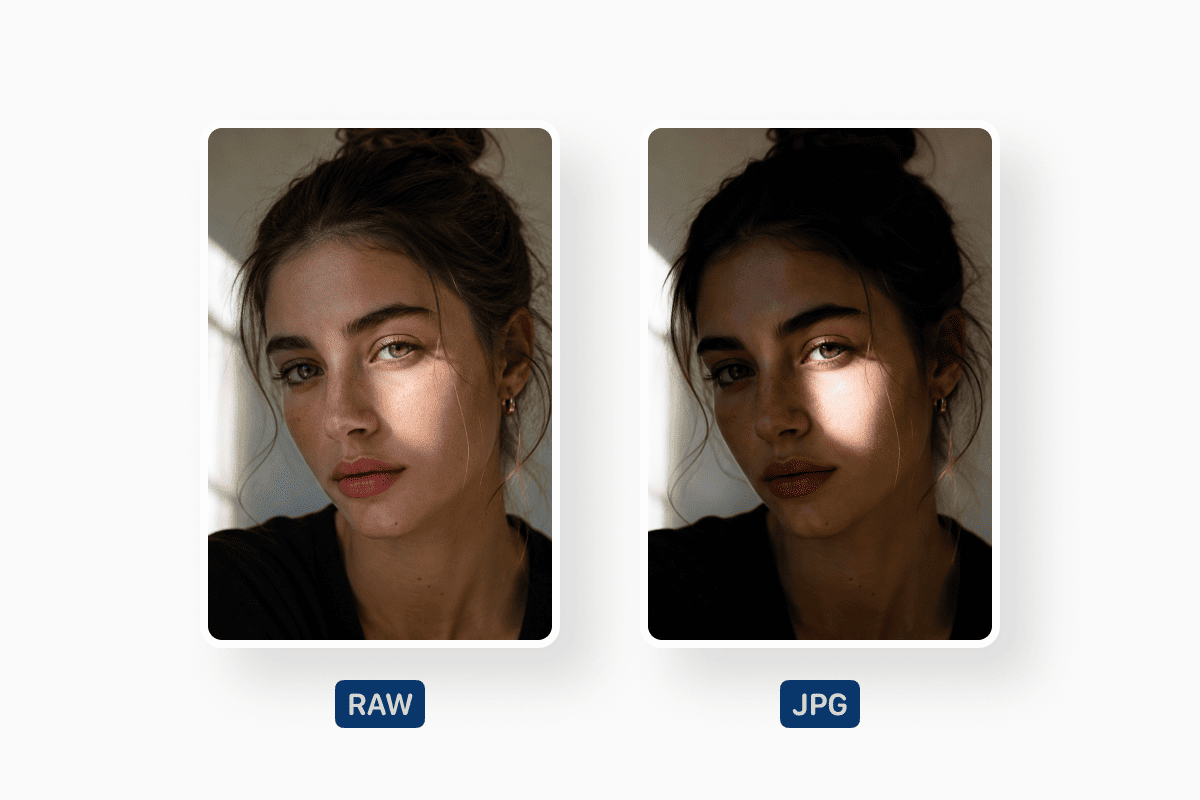
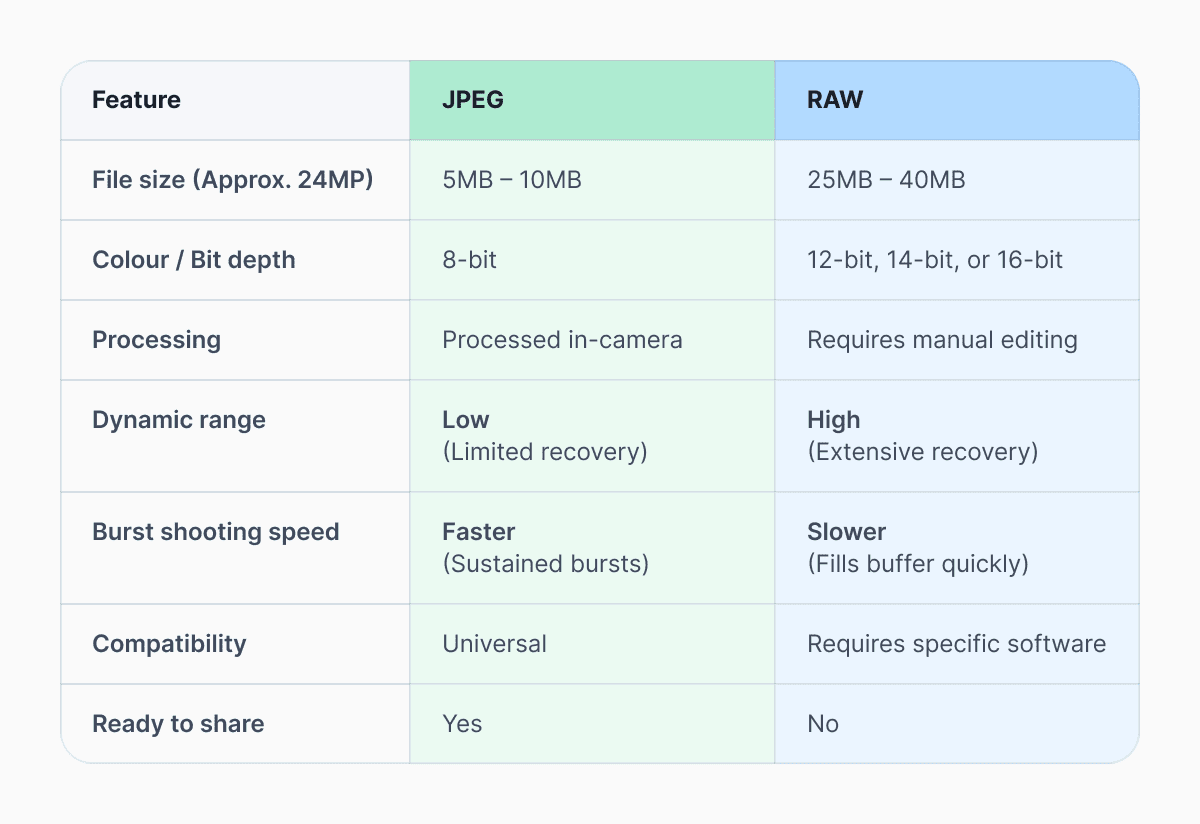
In contrast, a JPEG is a finished, fully processed image. The camera applies its chosen settings (such as color profile, contrast curve, saturation, and sharpening), compresses the data into an 8-bit JPEG file, and permanently discards unnecessary information to create a much smaller, immediately usable, and shareable file.
This core distinction is data retention versus immediate usability and forms the basis for nearly all arguments in the RAW vs. JPEG discussion.
Which format gives better image quality?
Most RAW files record 12-bit or 14-bit color depth, capturing thousands of tonal values per color channel. JPEGs are typically limited to 8-bit color, which can introduce banding in skies or smooth gradients. This extra data is especially noticeable when you adjust exposure, highlights, or shadows in post-production.
Reputable testing by imaging labs and publications consistently shows RAW files retaining significantly more highlight and shadow detail than JPEGs when pushed in editing. That said, image quality isn’t only about technical potential. A well-shot JPEG can look excellent straight out of the camera, especially with modern color science from brands like Canon, Sony, and Fujifilm.
Why do professionals use RAW?
The primary reason professionals stick to RAW is the volume of data available for post-processing. This provides them the maximum margin for error. Wedding photographers recovering blown highlights in a white dress, landscape photographers balancing bright skies and dark foregrounds, or commercial shooters matching brand colors across a campaign all benefit from RAW’s flexibility.
RAW files also support non-destructive editing. In apps like Adobe Lightroom or Capture One, adjustments are stored as instructions rather than permanently altering the file. This makes the RAW workflow ideal for projects that may need revisiting months or years later.
It’s worth noting that professionals don’t always shoot exclusively in RAW. Sports photographers on tight deadlines often rely on JPEG for faster delivery, especially when images need to be transmitted immediately.
Our beginner photographer's guide gives the low-down on conversion for common image file types, or you can take a deep dive into PNG, BMP, HEIC and TIFF formats.
Should I shoot photos in RAW or JPEG?
If you enjoy editing, printing your work, or want the best possible results from challenging lighting, shooting in RAW makes more sense. RAW files reward careful post-processing and are more forgiving when exposure isn’t perfect.
When to choose RAW:
- You are shooting in tricky lighting (e.g., golden hour or harsh midday sun).
- You plan on making significant creative edits or color grading.
- You intend to print your work in a large format.
If you value speed, simplicity, and minimal editing, JPEG may be the right choice. JPEGs are smaller, faster to write to memory cards, and easy to share straight from the camera or phone. They’re ideal for casual photography, social media, and travel when storage space is limited.
When to choose JPEG:
- You need to share photos instantly on social media.
- You are low on storage space during a long trip.
- You are shooting fast-action sports and need the highest burst rate.
Many modern cameras offer a compromise: RAW+JPEG. This setting saves both formats simultaneously, giving you a ready-to-use JPEG and a RAW file for deeper edits later. The trade-off is storage, which brings us to file size.
RAW file size vs JPEG compression
File size is often the deciding factor for beginners considering shooting in RAW. A typical JPEG from a modern 24-megapixel camera might be 5–10 MB, depending on compression settings. The same image captured in RAW can range from 20–35 MB. With high-resolution 45MP+ sensors becoming standard, RAW files can easily exceed 50MB to 80MB each.
This affects more than just your hard drive; it affects your camera's performance. If you shoot hundreds or thousands of images per session, RAW file size adds up quickly. This often means investing in larger memory cards and external storage, which is a real cost consideration.
For a deeper technical breakdown of JPEG compression and its limitations, the International Organization for Standardization provides background on how JPEG works and why it sacrifices data for efficiency.
Can you edit a JPEG like a RAW file?
Basic adjustments, such as cropping, slight exposure changes, and color tweaks, are fine. Problems arise when you push a JPEG too far. Heavy edits can introduce artifacts, color banding, and visible noise.
RAW files tolerate adjustments far better. You can recover highlights, lift shadows, and adjust white balance with minimal loss of quality. Adjusting the white balance of a JPEG often results in strange color shifts that look muddy compared to the cleaner adjustments possible in a RAW file.
This difference is why photo editing in RAW is recommended for learning photographers. It allows experimentation without permanently damaging the image. For more technical data on compression artifacts, Digital Photography School offers deep dives into how bit depth affects tonal transitions.
Does converting RAW to JPEG reduce quality?
While converting RAW to JPEG involves compressing and discarding data, this loss is typically imperceptible to the human eye when high-quality export settings are used. According to Adobe’s technical guides, this is a standard part of the RAW workflow. Once a RAW image is edited and converted to JPEG, those creative choices are "baked in." You cannot reverse-engineer the JPEG to change it, but you can always use the master RAW file to create a completely different JPEG.
The primary concern is not the initial conversion, but the repeated editing and re-saving of an existing JPEG. Each subsequent save applies more lossy compression, which compounds artifacts and degrades the image quality. Therefore, the best practice is to maintain the RAW file as the master copy and to export JPEGs only when needed for final use. If you’re happy with your image and need to further compress your JPEG, you can use Documents Image Compressor.
RAW vs JPEG in a modern workflow
If you want maximum image quality, flexibility, and long-term value, RAW is hard to beat. If you prioritize speed, convenience, and smaller files, JPEG remains a smart choice. Many photographers ultimately use both, letting the situation decide.
A balanced workflow might look like this: Shoot in RAW or RAW+JPEG. Opt for RAW files for images that matter, whether for printing, portfolios, or archival purposes. JPEG can be the better choice if your work involves quick sharing or if you’re shooting events where turnaround time matters. This is why many professionals still rely on JPEG in specific contexts, despite understanding RAW’s technical superiority.
Whether you're in need of JPG, PNG, PDF, or more, you can convert your image files easily and securely using Documents Image Converter.
Latest posts

Knowledge Base
Video file formats explained: MP4, MKV, AVI and more
Learn the difference between video file formats (MP4, MKV, AVI, MOV, WebM) and codecs (H.264, H.265, AV1). Find out which format is best for social media, professional editing, and universal compatibility in 2026.
Knowledge Base
The beginner photographer’s guide to file conversion (RAW, JPEG, TIFF, PNG)
A beginner-friendly guide to converting RAW, JPEG, TIFF, and PNG photos. Learn quality tradeoffs, export settings, and smart archiving habits for web and print.
Knowledge Base
How to make a GIF: simple steps to create and share loops online
Making a GIF is simple: trim a short moment from a video, convert it, and save the loop. Whether you’re using a browser-based converter like Documents.io or an app, the key is to keep it short, clean, and seamless for easy sharing anywhere.