


With video consumption reaching an all-time high, understanding video file formats is no longer just for experts. Whether you are a creator trying to preserve every pixel of a cinematic masterpiece or a marketeer trying to fit a high-definition video into an email, the form of your data matters just as much as the content itself.A video file is a combination of two distinct technologies: the codec and the container. While many people use the terms interchangeably, they serve different roles. A codec (compressor-decompressor) is the algorithm that shrinks your video for storage and expands it for playback. The container, or the file extension you see (mp4 or mkv), is the digital box that holds the video stream, audio tracks, subtitles, and metadata.
The most common video file formats in 2026
Each file type has been engineered for a specific balance of quality, compatibility, and file size.
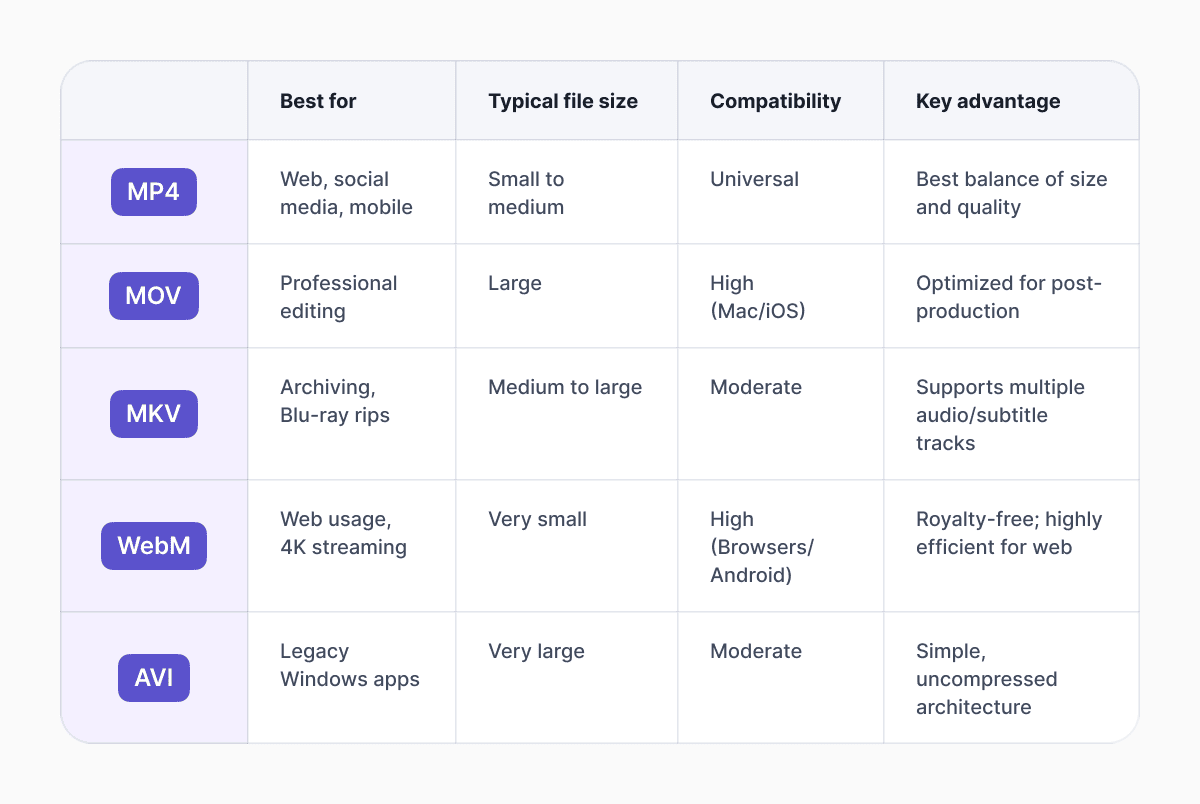
- MP4: Still the undisputed king of compatibility. If you need a video to play on any device, MP4 is the safest bet. It typically uses the H.264 or H.265 codec, offering a near-perfect balance between small file size and high visual fidelity.
- MOV: Developed by Apple, this format is the darling of the professional editing world. It is a high-bitrate container, meaning it prioritizes image quality over compression. While MOV files are significantly larger than MP4s, they are much easier for software like Final Cut Pro or Premiere Pro to process without lagging.
- MKV: Often favored by tech-savvy users, it is an open-source, universal container format. It is incredibly flexible, capable of holding an unlimited number of video, audio, and subtitle tracks in a single file. This makes it the go-to for high-definition film archiving and fans of foreign-language cinema.
- WebM: Introduced by Google as a royalty-free alternative for the web, WebM is designed for performance. It uses modern codecs like VP9 and AV1 to deliver high-quality video at bitrates lower than MP4, making it a favorite for 4K streaming and web-based animations.
- AVI: One of the oldest formats in the book, developed by Microsoft in the 90s. While it is less efficient than modern formats, it remains relevant for users who need a lossless, uncompressed file for specialized legacy systems.
What are the most common and best quality video file formats?
Choosing the best format depends entirely on your destination. For instance, if you're opting for YouTube, it's recommended to go for MP4 with the H.264 codec. However, recent benchmarks from early 2026 suggest that for 4K and 8K uploads, using the AV1 codec or H.265 provides superior image scores while keeping upload times manageable.
Quality is often a product of the codec rather than the container. MOV and AVI can support lossless or intra-frame compression, so are often perceived as higher quality. If you are looking for the absolute peak of visual performance, HEVC (H.265) and AV1 are the leaders. Professionals often stick to MOV as the master file to ensure no data is lost during editing, then convert to a smaller format like MP4 for final delivery.
If you are wondering which video format is compatible with all devices, the answer remains MP4. In contrast, while MKV offers more features, it still requires third-party players like VLC on many mobile devices.
Comparing the big five
To understand the trade-offs between these popular containers, it helps to see how they stack up across key performance metrics.
How do video codecs affect file size?
The codec is the primary driver of a file's size. For the smallest video format, consider WebM or MP4 with the AV1 codec. These are designed for the modern web, where bandwidth is precious.
The efficiency of a codec is measured by how much data it can throw away without the human eye noticing. Older codecs, like those in AVI files, are inferior; they save almost every bit of data, resulting in chunky files that can take hours to upload. Modern AI-driven codecs can identify static backgrounds and update only the pixels that actually move, drastically reducing file size.
The difference between MP4 and AVI
When comparing MP4 vs AVI, it’s a battle of the new world versus the old. AVI was designed for the desktop era, and it’s a simple, robust format that doesn’t require much processing power to play. However, it lacks the ability to store modern metadata efficiently and produces massive files. MP4, on the other hand, was built for the internet. It supports high-efficiency compression, making it the standard for everything from Netflix to TikTok.
Can I convert one video format to another?
Absolutely. If you find yourself with an MKV file that won’t play on your iPad, you can convert video formats using Documents Video Converter.
However, be aware of transcoding loss. Every time you convert a video from one compressed format to another, you lose a tiny bit of detail. This is why it is always better to go back to your original master file if you need a different version.
Best video format for web and social media
For developers and social media managers, the goal is speed. For the web, WebM is highly optimized for HTML5, though it still lacks universal support in older versions of Safari. For social platforms, the specs are more rigid. Heres a quick overview:
- YouTube: MP4 (H.264/AV1) at 16:9 or 9:16 for Shorts.
- Instagram/TikTok: MP4 or MOV, strictly 9:16 vertical.
- Facebook: MP4 or MOV, with a 4GB file limit.
According to SocialBee research, 1080p videos in 16:9 remain the standard, but algorithms increasingly prefer 4 K for high-engagement content.
Understanding these formats is about more than just technical trivia; it’s about ensuring your digital memories and professional projects look as good five years from now as they do today. By picking the right container and codec, you future-proof your content against the ever-changing standards of the digital world.
For the average user, stick to MP4 for sharing, MOV for editing, and MKV for personal libraries. MP4 with H.264 is the most compatible; H.265 and AV1 offer higher efficiency; MOV with ProRes is best for professional editing. Choosing the right file type is essential in a world of 4K/8K/HDR.
Latest posts

Knowledge Base
The beginner photographer’s guide to file conversion (RAW, JPEG, TIFF, PNG)
A beginner-friendly guide to converting RAW, JPEG, TIFF, and PNG photos. Learn quality tradeoffs, export settings, and smart archiving habits for web and print.

Knowledge Base
How to make a GIF: simple steps to create and share loops online
Making a GIF is simple: trim a short moment from a video, convert it, and save the loop. Whether you’re using a browser-based converter like Documents.io or an app, the key is to keep it short, clean, and seamless for easy sharing anywhere.
Knowledge Base
FLAC vs WAV: The real story behind “perfect” audio
FLAC and WAV both deliver lossless audio, but they’re built for very different workflows. Here’s what actually matters beyond the audiophile debates.