

Most people use JPG and PNG every day without really thinking about the difference. You save an image, attach it to an email, upload something to Instagram, share a screenshot — and hope the format doesn’t ruin the quality or bloat the file size.
The problem is that both formats are good, just not good for the same thing. One is built for photos and realism. The other is built for sharp edges, text, and transparency. When you understand that split, choosing gets a lot easier.
We will walk you through the difference in quality, compression, transparency, printing, screenshots, and real-world use cases like social posts, digital art, and presentations. By the end, you’ll have a mental shortcut you can reuse without digging into specs.
The quick mental model
- JPG = photographs / realism / small file size
- PNG = graphics / sharp edges / transparency
That’s the foundation. Everything else branches from those traits.
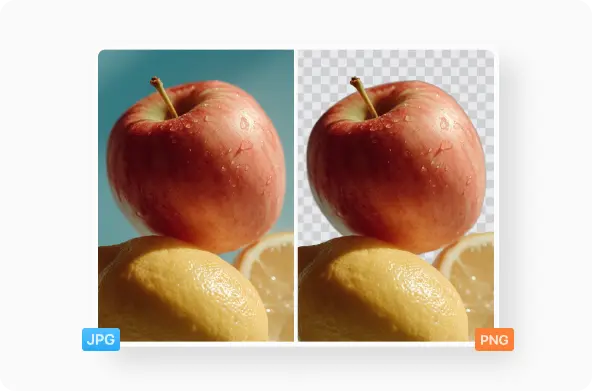
Compression and quality: how each format treats the image
The biggest difference is compression. JPG uses lossy compression, which means it throws away some pixel data to shrink the file. You usually don’t notice it in photos because natural textures hide the loss. Skin, clouds, shadows, grass - these are “forgiving.”
PNG is lossless, meaning the image is preserved exactly. That matters if you have flat colors, text, vector-style shapes, or UI elements. These surfaces aren’t forgiving. If compression introduces even a tiny blur or staircase effect on edges, it’s obvious.
So, when people ask “Is PNG better quality than JPG?” the accurate answer is:
PNG preserves original quality better, but JPG looks great for photographs while staying much smaller.
File size: when it actually matters
The reason JPG is everywhere is size. A photo that weighs 4 MB as a PNG might drop to 600 KB as a JPG without looking different to the eye.
That matters when:
- You upload a gallery
- You share files by email
- You embed visuals on a web page
- You care about loading speed or storage
PNG is heavier, but its size is the trade-off for edge clarity and transparency. If you’re choosing a logo for a website, clarity is more important than weight, which is why logos and UI icons are almost always PNG.
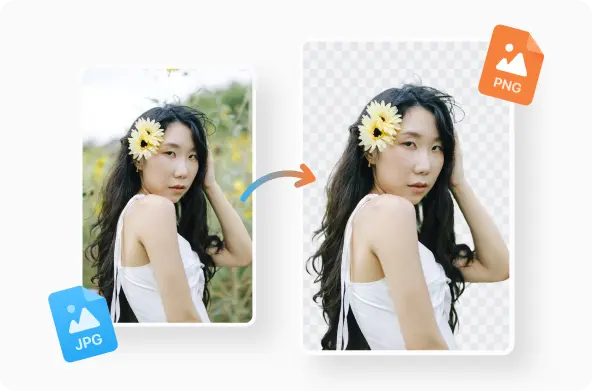
Transparency: the key feature JPG simply doesn’t have
Only PNG supports backgrounds that can be removed or remain transparent.No matter the settings, a JPG always has a solid background.
This affects:
- Logos
- Watermarks
- Overlays and stickers
- Product mockups
- App UI
- Social thumbnails with cutout portraits
If you need the image to “sit” on top of another background, it must be PNG.
Printing vs on-screen images
A lot of guides get this part wrong by oversimplifying it into “PNG for quality.” The truth is more nuanced:
|
Use case |
Better choice |
Why |
|
Photography prints |
JPG |
Excellent realism + manageable size |
|
Vector art / flat colors in print |
PNG |
Crisp lines survive scaling |
|
Web graphics |
PNG |
Transparency + sharp UI shapes |
|
Marketing photos on websites |
JPG |
Faster load, no visible loss |
So if you’re an illustrator or designing posters, PNG gives you cleaner edges. If you’re printing a holiday photo, JPG is still the standard and works perfectly.
Screenshots: why this is where confusion happens
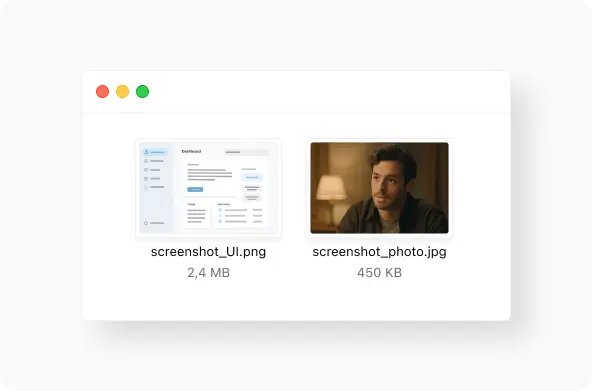
macOS, iOS, and many Linux distros save screenshots as PNG by default. That’s not an accident: UI elements, text, and interface shapes need pixel-perfect clarity. PNG preserves every point.
However, if you’re taking a screenshot of a website, a streaming video still, or anything photo-heavy, converting to JPG can make the file dramatically smaller without hurting readability.
This is why you often see people asking “Difference between JPG and PNG screenshot.”
It depends on what’s in the screenshot:
- UI, text, diagrams → PNG
- Large visual / photo content → JPG
JPG vs JPEG: same format, different extension
There is no technical difference between JPG and JPEG. The “.jpg” version originated from early Windows’ three-letter extension limit, while “.jpeg” remained on other systems. Today they’re interchangeable.
Real-world examples by user type
Different people hit different bottlenecks when choosing a format. Here’s how it breaks down in practice:
1. Photographers
- Use JPG for photo exports and sharing
- Use PNG only for overlays or watermark assets
2. Designers / UI and web work
- PNG for icons, badges, mockups, UI kits
- JPG only for photographic backgrounds
3. Illustrators & digital artists
- PNG for line art, flat shading, comics, transparency
- JPG if exporting final posters for print when size matters
4. Social media use
- JPG is great for most posts
- PNG is better for crisp text, collages, app UI previews
- Some platforms re-compress PNGs anyway, which can neutralize benefits
5. Presentations & PDFs
- JPG keeps file sizes light
- PNG is better for diagrams and charts inside presentations
When to convert — and how to do it without losing detail
You don’t have to “pick once and stick with it.” It’s normal to convert depending on context.
For quick conversion, you can use Documents.io in the browser. It’s useful when you only need a format switch without installing software. Because it processes images directly in the browser, it avoids the privacy trade-offs of uploading files to third-party servers, and there are no watermark restrictions.
The takeaway
If you remember only one thing:
- Choose JPG when your image is a photo or realism and size matters.
- Choose PNG when your image needs clarity or transparency.
That’s the split. Once you know which side your content belongs to, the decision is effortless.
Related topics worth exploring
Inside the file types section, this topic usually sits alongside:
- What is a PNG file
- What is a JPG file
- HEIC vs JPG
- WebP vs PNG
- GIF vs PNG
These comparisons show the bigger trend: image formats are evolving for performance, but PNG and JPG stay dominant because they solve different problems.
FAQ
Is PNG better quality than JPG?
PNG preserves the original data, so technically yes but the visible difference matters mainly for graphics, not photos.
Does PNG to JPG reduce quality?
Yes. When you convert to JPG, compression throws away some pixel detail. For photos, it’s barely visible. For line art, it’s obvious.
Should I save art as PNG or JPEG?
For illustrations, comics, and digital line work, use PNG. The clean edges survive scaling.
JPG or PNG for social media?
Usually JPG, because platforms compress uploads. PNG is useful when text or transparency is essential.
Latest posts

Knowledge Base
Video file formats explained: MP4, MKV, AVI and more
Learn the difference between video file formats (MP4, MKV, AVI, MOV, WebM) and codecs (H.264, H.265, AV1). Find out which format is best for social media, professional editing, and universal compatibility in 2026.

Knowledge Base
The beginner photographer’s guide to file conversion (RAW, JPEG, TIFF, PNG)
A beginner-friendly guide to converting RAW, JPEG, TIFF, and PNG photos. Learn quality tradeoffs, export settings, and smart archiving habits for web and print.
Knowledge Base
How to make a GIF: simple steps to create and share loops online
Making a GIF is simple: trim a short moment from a video, convert it, and save the loop. Whether you’re using a browser-based converter like Documents.io or an app, the key is to keep it short, clean, and seamless for easy sharing anywhere.