

A CSV file looks like a very ordinary text file at first glance, but it quietly powers a large part of how data moves between apps and services. If you have ever exported a contact list, downloaded a bank statement, imported analytics into a dashboard or uploaded a product catalog to a website, there is a good chance you already worked with a CSV without realizing it.
CSV became popular because it does one thing very well: it stores rows of information in a lightweight, readable way that almost any app can open. There is no styling, no formulas, no formatting overhead. Just the actual values.
That simplicity is the reason it still matters in a world filled with more complex file types.
What does CSV stand for?
CSV means Comma Separated Values. Each value in a row is separated by a comma, and each new line represents the next row. It is a plain text format, which means it can be opened in a spreadsheet tool like Excel or Google Sheets, but also in a basic text editor.
Depending on your region, some files use semicolons instead of commas. That is because in some countries a comma is already used as a decimal separator. The logic is the same, though: separate each value with the same character so software can tell where one column ends and the next begins.
Because the structure is simple, CSV files are cross-platform. A file created in Excel on Windows opens the same way in Google Sheets on Mac or in a database importer on Linux. For many developers and analysts, this universality is the real value of the format.
What is a CSV file used for?
A CSV file is used whenever data needs to be moved from one tool to another. CRMs use it to import contact lists. Finance apps use it to export transaction histories. E-commerce platforms use it to upload or edit product inventories in bulk. In education and research, CSV is the standard way to share datasets because it remains readable even decades later.
This makes CSV the default for exchanging structured information without embedding any design choices or formatting. The receiving tool can decide how to display or process it.
CSV vs Excel: what is the difference?
This is a common point of confusion. A CSV is not an Excel file, although Excel can open it.
A CSV is just text. There are no formulas, no cell colors, no column widths, no hidden metadata. Excel (.xlsx) is a spreadsheet format that can store styling, macros, graphs and calculations.
So if a CSV and an Excel sheet look similar when you double-click them, the difference is in what is stored inside. CSV holds only the values, Excel holds both values and presentation.
Is a CSV a PDF?
No. PDF is for viewing and sharing. CSV is for storing structured data. You can convert a CSV to PDF if you want a read-only version.
What does a CSV file look like?
Here is a simple example of what a CSV might contain:
Name,Email,Age
Sarah,sarah@example.com,29
Diego,diego@example.com,31
Lina,lina@example.com,25
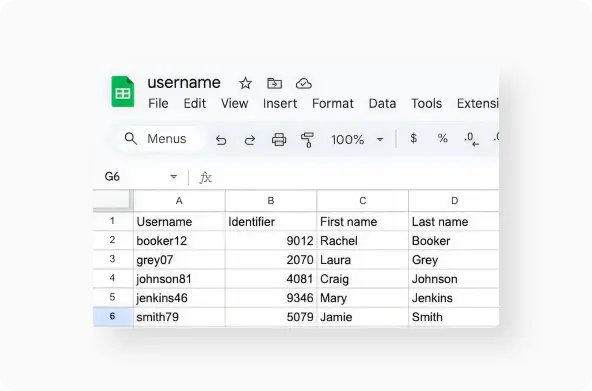
If you open it in a text editor it looks like raw text. If you open it in a spreadsheet app, each comma becomes a column. That is the entire mechanism: readable, predictable, and easy to parse.
How to open a CSV file
Most people open CSV files in Excel or Google Sheets because they want to view it in columns. However, a CSV can also be opened in any text editor, including Notepad or TextEdit.
A text editor is useful when you want to inspect encoding or formatting problems. A spreadsheet app is useful when you plan to edit, filter or analyse the data.
If you want to understand how spreadsheets store richer formatting, you can also check our related glossary page on what an XLSX file is. And if you are curious about how raw text formats behave behind the scenes, it is also closely related to what a TXT file is.
How to create a CSV file
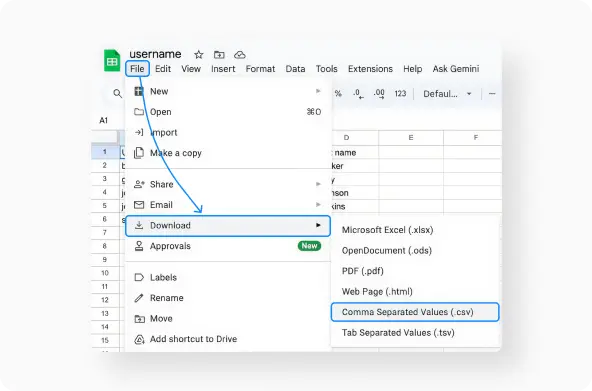
There are two main ways to create a CSV file. The first is through a spreadsheet. You create a normal table in Excel or Google Sheets, then export or save it as CSV. The second is through a text editor. You write values separated by commas and save the file with a .csv extension.
The spreadsheet method is easier for most people because it is visual. The plain text method is common among developers and data analysts because it gives more control over how the file is structured.
Why commas matter: separators and formatting pitfalls
Because CSV is simple, everything depends on separators. If your system uses a comma for decimals, the file might switch to semicolons to avoid confusion. When Excel opens a CSV with the wrong separator setting, you may see all values appear in a single column. Google Sheets usually prompts you to choose a separator on import, which helps avoid this issue.
Encoding is another detail that matters. When a CSV is saved in a non-UTF encoding, accented characters or symbols can break. This mainly affects international datasets. Opening the CSV in a text editor helps confirm whether the problem comes from encoding or column separators.
Converting CSV files
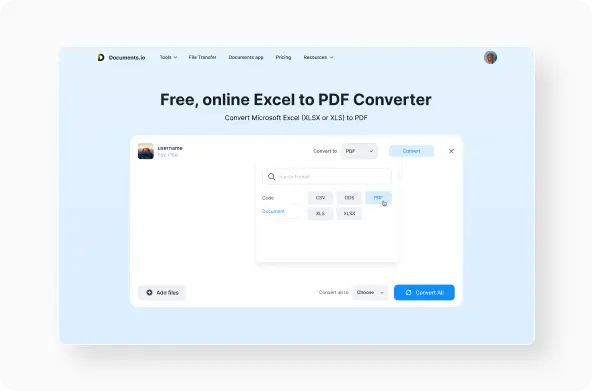
CSV is great for exchange, but not ideal for presentation. Once you want to share your file with someone who does not need to edit it, converting it can be useful. Some users convert CSV to Excel to continue editing with formulas. Others convert CSV to PDF for sending or archiving, or to JSON for use in apps and APIs.
This is where online converters like Documents.io are helpful because the process is one-step and works in the browser with no software installation. If you work frequently with structured data, you can convert CSV to Excel, CSV to PDF, CSV to JSON or even back to TXT format when needed.
Common mistakes when working with CSV files
Most CSV problems appear during import and export. The most frequent issues are:
• separators interpreted incorrectly
• numbers automatically converted into dates by spreadsheet tools
• character encoding errors when moving data between systems
These are not limitations of the format, but side effects of apps trying to be helpful. When you know how CSV is stored, it becomes easy to recognise and fix these errors.
The takeaway
CSV is proof that simple formats can outlast more complex ones. It moves cleanly between apps, serves as a bridge between tools and remains readable as plain text. That is why it is still used across industries, from finance to research, logistics to education.
If you need to convert or reuse a CSV file quickly, Documents.io offers fast CSV to XLS, XLSX, PDF or ODS conversion in the browser with no download required. It is designed for people who work with data regularly and just need it to open or convert without friction.
FAQ
Is a CSV file an Excel file?
No. Excel can open CSV files, but the format is different. CSV contains only data, Excel contains data plus formatting.
How do I create a CSV?
Either export a spreadsheet as CSV or write values separated by commas and save with a .csv extension.
What is the full form of CSV?
Comma Separated Values.
Latest posts
Glossary
What is a DOCX file, and how do you open one without Word?
Got a DOCX file but no Microsoft Word? Learn what this popular document format is and the easiest ways to open and edit it

Glossary
What is an HTML file, and what should you do with one?
Found an HTML file and not sure what to do with it? Learn what HTML files are and the easiest ways to open, view, and edit them.

Glossary
What is an EPUB file, and how do you open one on your iPhone?
Got an EPUB file on your iPhone? Learn what this popular ebook format is and the easiest ways to open and read EPUB files.