

You don’t need to know anything about file formats to recognize a GIF. It’s the small looping animation you drop into a chat when you don’t want to say something, you want to show it — the “slow clap,” the blinking guy trying to process a situation, or the perfectly timed eyebrow raise that lands funnier than a sentence ever could. That practical expressiveness is why GIFs became the unofficial “reaction language” of the internet.
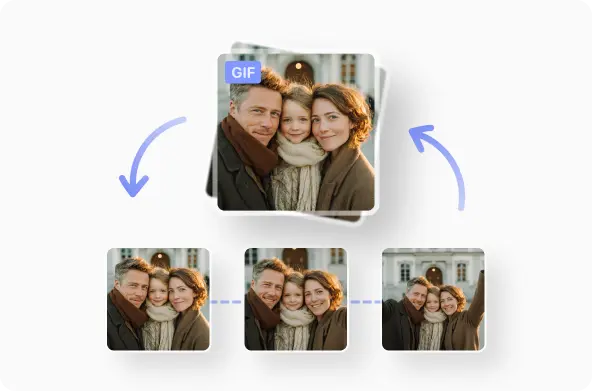
Even though GIFs live in the same family as images, they behave like a bridge between pictures and video. They look like a video in motion, but technically, they’re just a stack of frames compressed into a single file that repeats in a loop.
No audio. No controls. No pause button. They just play.
What does GIF actually mean?
“GIF” stands for Graphics Interchange Format. It was created in 1987 by CompuServe as a way to share images online at a time when bandwidth was tiny and connections were slow. Video was too heavy to distribute widely back then, so a format that could “fake motion” using small image frames was a breakthrough.
The looping part didn’t just make GIFs feel alive — it made them memorable. The moment repeats itself until you understand it, almost like visual punctuation. This is the reason GIFs stayed culturally relevant even when modern video formats became smaller and higher quality.
What is a GIF used for?
GIFs serve two main roles today: quick expression and tiny visual storytelling.
In texting and chat apps, people sometimes treat them like facial expressions you can paste into a conversation. The GIF is the tone. It doesn’t require setup or explanation. When someone sends Kermit sipping tea, they’re not talking about tea. They’re hinting, “I noticed something… but I’m not saying it outright.”
In texting, a GIF is basically a shortcut for emotion — a micro reaction, delivered visually.
GIF vs meme: what’s the difference?
This is another common question because the two overlap in practice but not in definition.
A GIF is a format.
A meme is an idea or joke.
You can have a meme that is a GIF, or a meme that is a still image, or even a meme that’s just text. The meme is the content, the GIF is the container.
The easiest comparison is from the image world: PNG vs JPG. The file type is not the joke — it’s just the packaging. (Internal link: PNG vs JPG)
Why did GIFs become so popular?
The GIF became enormously popular because it hit a sweet spot: technically, it was built for the constraints of early-internet culture (small files, colour support, universal display) and sidestepped the complexities of full video.
Culturally, it gave digital communication a kind of visual gesture language - one that loops, repeats, and communicates tone, emotion and reference far more efficiently than plain text.
In the era of social sharing, memes, chat, and rapid reaction, GIFs provided a media format that felt immediate, relatable and endlessly reusable. They became part of the ambient fabric of online life, rather than a special media event.
GIFs succeed because they are tiny loops of meaning. They’re closer to body language than media. A shrug, a smirk, a slow blink — these are gestures that become funnier or clearer when they repeat.
GIF (famous GIF)
Are GIFs the same as video?
Not really. They often start as video, but once converted, they behave much more like an image. A GIF doesn’t store audio, and it uses a limited color palette to stay small. Video formats (like MP4 or WebM) can compress much more efficiently without losing detail, while GIFs trade detail for compatibility.
That’s why modern browsers and platforms sometimes prefer WebP when showing looping media — it’s smaller and sharper — but people still recognize GIFs by name, which is why the format stays sticky in everyday conversation.
Why do people still use GIFs if newer formats exist?
Because compatibility still wins. A GIF will play inside a messenger, in email clients, on older devices, and inside social platforms without worrying about codecs or players. Modern formats may be superior, but GIFs are understood everywhere, which makes them ideal for casual sharing.
The format also doesn’t demand attention. A video has intent behind it: a GIF is closer to a gesture. That difference is why short video clips are used for explanation, while GIFs are used for expression.
What is a GIF and how do you use it?
You use a GIF the same way you’d use tone in speech. Instead of writing “I’m confused,” someone might paste the blinking reaction GIF. Instead of typing “that escalated quickly,” they might send the Ron Burgundy loop. The GIF doesn’t replace meaning, it colors it.
That’s also why GIF keyboards exist in messaging apps. They’re not “media assets,” they’re reactions packaged inside a familiar file type.
When is a GIF not the best choice?
If you need sound, a GIF won’t help. If the clip is long, GIFs get large very quickly. And if you care about high color fidelity or gradient smoothness, video formats handle that more gracefully.
This is why tutorials, product explainers, and gameplay highlights often move from GIF to MP4 he longer the moment, the better video performs.
From definition to creation
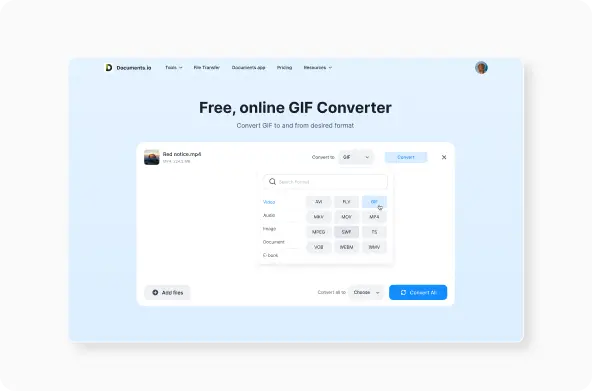
Even though this article is about what a GIF is, most people reading a glossary entry eventually want to create one themselves. If you ever reach that point, the quickest way is to convert a short video clip into a looping GIF.
This is where a browser-based converter like Documents.io is useful.
The takeaway
A GIF is a lightweight looping image format that behaves like a hybrid between a picture and a tiny piece of video. It doesn’t have sound, and it deliberately limits color detail so it can load instantly and play without controls. That simplicity is what turned GIFs into an everyday communication tool rather than just another file format.
They’re still used because they’re frictionless, familiar, and expressive — a visual shortcut for feeling or tone. And even though newer formats like WebP and MP4 can outperform GIFs technically, none have replaced its role in daily conversation.
Latest posts
Glossary
What is a DOCX file, and how do you open one without Word?
Got a DOCX file but no Microsoft Word? Learn what this popular document format is and the easiest ways to open and edit it
Glossary
What is an HTML file, and what should you do with one?
Found an HTML file and not sure what to do with it? Learn what HTML files are and the easiest ways to open, view, and edit them.
Glossary
What is an EPUB file, and how do you open one on your iPhone?
Got an EPUB file on your iPhone? Learn what this popular ebook format is and the easiest ways to open and read EPUB files.