

If you have ever downloaded a logo with a transparent background, shared a sticker, saved a screenshot on your phone, or exported artwork from a design tool like Figma, you have already worked with a PNG file. The format is so common in daily digital workflows that most people use it before they learn what it actually is.
PNG stands for Portable Network Graphics. It is a raster image format that focuses on detail and clean edges while keeping the original quality intact. Unlike JPG, which trades detail for a smaller file size, PNG stores the full information of every pixel. That is why screenshots, UI elements, illustrations and icons often appear crisp when saved as PNG.
What is a PNG file used for?
PNG is used wherever visual clarity matters more than file size. Designers choose it for icons or interface elements because the edges remain sharp on screens of any size. Illustrators use it to export assets with transparent backgrounds. Brands share their logo in PNG format to make sure it looks correct regardless of the background it is placed on.
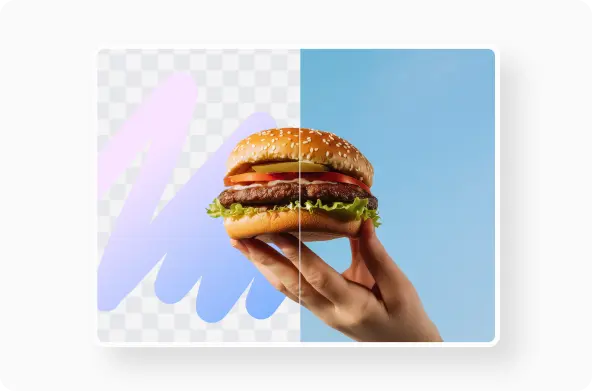
The transparency feature is the key reason people choose PNG over JPG. A JPG always has a background, while a PNG can be layered on top of anything. That makes PNG especially useful for digital products, web design, stickers, UI kits, infographics and app imagery.
On screen vs in print
PNG was created for screens. It works best in digital interfaces, websites, mobile apps and anything meant to be displayed rather than printed. For professional printing, formats like TIFF or vector-based SVG are often preferred because they are resolution-independent and retain sharper output in large prints.
In other words:
- PNG is ideal when you care about clean edges and background transparency on screens
- TIFF or vector formats are better when you want perfect scaling in physical print
You can explore those differences further in our file guides for TIFF and SVG.
PNG vs JPG vs WEBP
PNG and JPG are often compared, but they are built for different goals.
JPG is optimized for photography where soft gradients and natural light matter more than strict edges. It also compresses more, which means smaller files. PNG keeps detail intact, but the file size can be noticeably larger.
WEBP is a newer format used mostly on modern websites. It offers smaller file sizes than PNG, sometimes without visible quality loss. For online publishing and large image libraries, converting PNG to WEBP can reduce loading times significantly.
That is why many designers export final assets in PNG first, then convert to WEBP before publishing. It keeps the working file clean and gives a more efficient output format for the web
Is a PNG the same as a PDF?
Not at all. A PNG is a single raster image. A PDF is a display container that can include images, text, vector shapes and even multiple pages. If you want to share a logo or illustration for viewing only, converting a PNG to PDF can make it easier to print or attach, but it no longer behaves like an editable image file.
If you are curious about how PDFs behave, we also have a detailed article on what a PDF file is.
How do I open a PNG file?
PNG is one of the most widely supported image formats in computing. You can open it on virtually every device without installing anything.
It opens in:
- Preview on macOS
- Photos on Windows
- The default gallery app on smartphones
- Any modern web browser
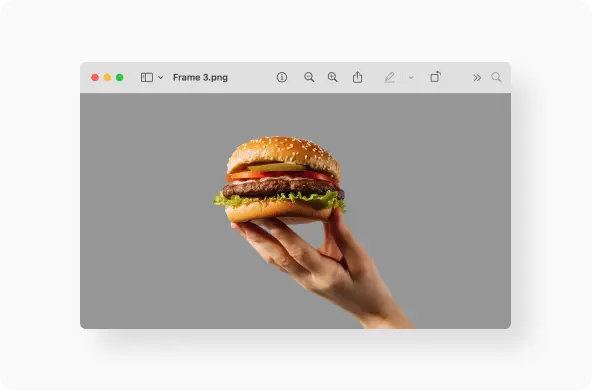
For editing, apps like Photoshop, GIMP, Procreate, Figma, Sketch and Canva support PNG natively.
This is another reason the format became a universal standard. It does not lock users into any specific software.
Quality and compression
PNG is a lossless format. That means the image retains its original detail every time it is saved. With JPG, each saving introduces a little more compression, slowly reducing quality. With PNG, the image will look the same no matter how many times you reopen or re-save it.
The trade-off is file size. Detailed images with gradients can become quite large. This is where a conversion or compression tool comes in handy. If you only need the final asset for publishing, converting PNG to WEBP or JPG keeps things lighter and loads faster. For storage and sharing, converting PNG to PDF can provide easier document-style distribution.
Creating and exporting PNG
Most image editors let you export to PNG with a single action. The logic is usually: create artwork, remove background if needed, then export. Because PNG supports transparency, it is the go-to format for overlays, icons, app assets and UI screens.
If you are working with photography, JPG remains more appropriate unless transparency or pixel-perfect sharpness is required.
Converting PNG files
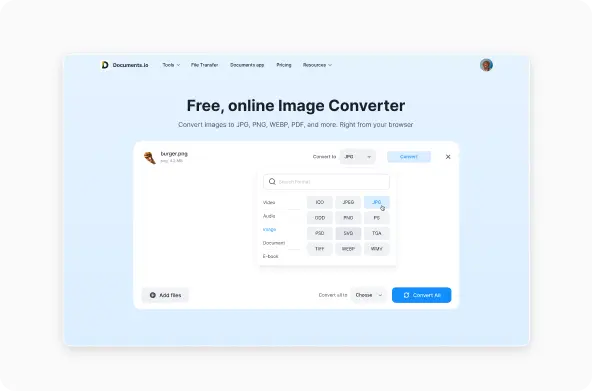
One of the most frequent questions users have is how to convert a PNG to JPG or a PNG to PDF. Others convert into WEBP to optimise performance for the web. This step typically happens after the image is finalised and ready to be shared.
You can convert PNG to JPG, PNG to PDF or PNG to WEBP instantly using Documents.io. The conversion runs in your browser, so there is nothing to install. It is also useful when a recipient asks for a different format, or when a platform only accepts certain file types.
When you finalise a graphic in PNG but need to share it in a more universal format, conversion becomes part of the workflow. Some users convert PNG to PDF for sharing or printing, others convert to JPG for lighter storage, and web teams use WEBP for page speed.
A browser-based tool like Documents.io is useful here because you can convert quickly without reopening editing software or changing your original export settings.
File format relationships
Because PNG is raster-based, it differs from vector image formats like SVG, which scale without losing quality. It is also different from animated formats like GIF. For certain motion graphics or light loops, GIF remains common, but PNG is still the choice for static design assets.
If you are curious about how these formats interact, you can check our guides on JPG, SVG, GIF, PDF and TIFF. Together they form the visual core of the file type ecosystem.
The takeaway
PNG excels in clarity, transparency and screen-based design. It is not always the smallest format, but it is often the most precise. Whether you are preparing UI assets, sharing branded graphics or refining an illustration, PNG gives you pixel-perfect accuracy without introducing compression artifacts.
And when you need a different file type, Documents.io lets you convert PNG to JPG, WEBP or PDF without losing control of the result. It keeps your workflow flexible while letting you choose the right format for the right purpose.
FAQ
What is a PNG file used for?
It is used for digital images where clarity and transparency matter, such as logos, UI elements, stickers and interface graphics.
Is a PNG the same as a PDF?
No. A PNG is an image. A PDF is a container that can hold many image or text layers.
How do I convert PNG to JPG?
Use an online tool like Documents.io to export from PNG to JPG or WEBP depending on your goal. JPG is lighter, WEBP is more web-optimised.
How do I open a PNG file?
Just double-click it. Your device already supports it by default.
Latest posts
Glossary
What is a DOCX file, and how do you open one without Word?
Got a DOCX file but no Microsoft Word? Learn what this popular document format is and the easiest ways to open and edit it
Glossary
What is an HTML file, and what should you do with one?
Found an HTML file and not sure what to do with it? Learn what HTML files are and the easiest ways to open, view, and edit them.
Glossary
What is an EPUB file, and how do you open one on your iPhone?
Got an EPUB file on your iPhone? Learn what this popular ebook format is and the easiest ways to open and read EPUB files.