


What should you do if you received a file Final_Offer.docx, but you don’t have Microsoft Word on your device and the preview doesn’t show you anything?
The good news is that DOCX stopped being a Microsoft-only format almost twenty years ago. It’s a published standard, and a dozen apps on your phone can already read it. The bad news is that nothing on iOS tells you that, so people assume the file is broken or that they need a subscription.
What a DOCX file actually is
Take any .docx file, change its extension to .zip, and unzip it. You’ll see a folder structure like this: a [Content_Types].xml file that says what’s inside, a _rels folder that says how the pieces connect, and a word folder with document.xml (where you’ll find your text along with its formatting), styles.xml, plus a media folder containing any images you’ve added.
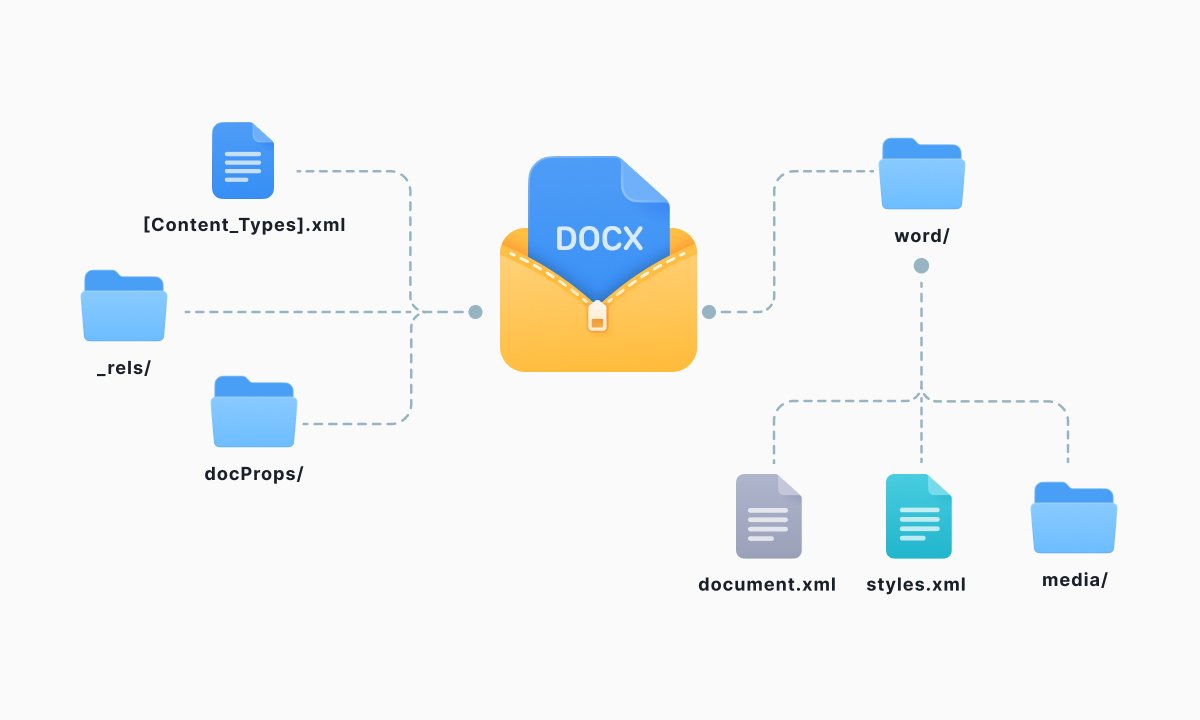
Open document.xml in a text editor and your sentences will be surrounded by XML tags. That’s the entire layout. Microsoft calls the output Open XML, and among the advantages it advertises is one that’s just plain practical: all you need to read and edit an Office document is a ZIP utility and a text editor.
So, is a DOCX file the same as a Word document? Yes. When people are saying “word document”, DOCX is the format they actually want.
DOC vs DOCX: what changed
The older .doc extension shows up constantly in downloads folders and old email threads, and the difference between the two is more than a letter.
|
DOC |
DOCX |
|
|
Era |
Word’s default up to Word 2003 |
Word’s default since Word 2007 |
|
What’s inside |
A single binary blob in Microsoft’s Compound File Binary Format |
A ZIP archive of XML parts, images, and fonts |
|
Size |
Larger |
Compressed, sometimes up to 75% smaller |
|
Macros |
Can carry VBA macros |
Macro-enabled documents use .docm |
|
If the file corrupts |
Usually unreadable end to end |
Often partly recoverable, since damage may hit only one part |
|
Openness |
Proprietary, reverse-engineered by everyone else |
Published as ECMA-376 and ISO/IEC 29500 |
For most users, the practical difference is compatibility in one direction. Anything modern opens a .doc; plenty of older software cannot open a .docx file.
If you’re sending a file to someone whose setup you don’t know, .docx is now the safer default, and it has been for years.
What program opens a .docx file?
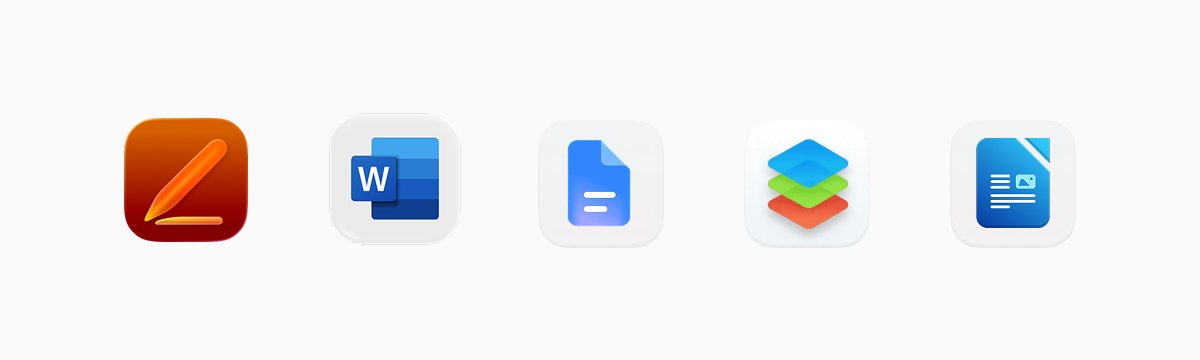
On iPhone and iPad, tap the file in Files and iOS shows you a read-only preview. To do more, tap Share and pick an app.
Apple’s Pages is free and it opens DOCX, which is then converted to its own format. Microsoft’s Word app is also free for basic editing on screens up to 10.1 inches, which covers every iPhone and most iPads, though a 13-inch iPad Pro needs a qualifying Microsoft 365 subscription before it will let you type a word.
One caveat to be aware of: Microsoft removed document editing from the 365 Copilot app for iOS as of September 15, 2025. If you have that app and it keeps giving you a preview with a banner, it’s not broken. You need the standalone Word app.
If you’re on Android, Google Docs also natively supports DOCX, and most phones come with it. If you’re looking for a word processor that is closer to desktop, WPS Office and OnlyOffice are the usual choices.
And if it’s desktop, you can use Word or Pages on a Mac. Or LibreOffice Writer on anything, free. Word for the web at office.com, also free with a Microsoft account, which is often the fastest route when you’re on a borrowed machine.
How to open a DOCX file in Google Docs
An alternative way to open a DOCX file is by uploading it to your Google Drive, after which you double-click or tap to open it. Google opens Office files in edit mode and saves your edits directly to the .docx file, so the file remains a Word file and the sender can still open it in Word.
If you’d rather have a native Google Doc, open the file and choose File => Save as Google Docs. That creates a copy and leaves the original alone. Google’s own documentation spells out the tradeoff: conversion enables add-ons and a few sharing features not otherwise available, but you’re no longer editing the file your coworker actually sent you.
Check the formatting either way. Complex page layouts, bespoke fonts, and heavily formatted tables drift as they move between word processors, and they drift again on the return trip. For a CV or anything a hiring system will scrape, check the output before you send it.
How to edit a DOCX file (and when not to)
Opening and viewing a DOCX file is easy everywhere, but editing is another matter.
For making a few quick edits on a phone, the Word application or Google Docs can write real DOCX, so the file that comes out is the same type of file that went in. Pages will edit anything, but the aoo converts to Pages format on import, which means you have to remember to export back to Word before sending. If you don’t, your recipient will get a .pages file they can’t open.
So if other people need to review your document, don’t open it through a bunch of different apps. Better edit it, and when the document is done, convert it to PDF.
Is a DOCX file the same as a PDF?
No. A DOCX is the working document. Anyone can access it, rewrite the sentence, modify the text and style, and add a comment, and no one knows who made what change. A PDF is the finished copy. Layout is fixed, fonts are embedded, and it looks the same on a phone in Berlin as it does on a laser printer in Chicago. That’s why contracts, invoices, applications, and anything you sign comes as PDFs.
The practical rule: send DOCX when you want the other person to edit, send PDF when you don’t. Convert your document to PDF using Document.io’s DOCX converter, and once it’s a PDF, you can highlight it, fill in the fields, sign it with your finger, and email it back before your twenty minutes are up.
Going the other way (converting a DOCX file back into a Word document after someone sent you a PDF) is more difficult and lossy, which is a good reason to hold on to the original file rather than the export.
When a DOCX won’t open
Four causes cover almost everything.
- The extension is missing or wrong. Sometimes downloads come as Offer_Letter with nothing after it, and your system doesn’t know what to do with that. Rename it, add .docx, and try again.
- It isn’t a DOCX. .doc, .pages, .odt, and Google Doc links are all being referred to as “Word documents” by the people who send them. Look at what you actually got rather than troubleshooting the wrong problem.
- The download is corrupt. A file that opens as gibberish or refuses to open at all is often just an incomplete transfer. Download it again before you go looking for converters.
- It’s protected. Password-protected files will not open in preview on any platform, and files encrypted with corporate rights management are accessible only through the account to which they were issued.
One more thing worth knowing: a .docx cannot carry macros at all. Microsoft’s format rules reserve that for .docm, and Word on Windows now blocks macros in files that came from the internet by default. If a stranger emails you a .docm and asks you to enable content, don’t.
FAQ
Is a DOCX file the same as a Word document?
Yes. DOCX is the format Word has saved documents in since 2007, so when someone asks for a Word document, a .docx is what they want.
Can I open a DOCX file without Microsoft Word?
Yes, and usually without installing anything new. iOS previews DOCX in Files, Mail, and Messages. Google Docs edits it in a browser or on Android for free, Pages imports it on Apple devices, and LibreOffice Writer handles it on any desktop.
Can I edit a DOCX on my phone for free?
Microsoft’s Word app allows basic editing on screens up to 10.1 inches with a free Microsoft account, which covers phones and smaller tablets. Google Docs edits at any screen size for free. Pages is free on Apple hardware, though you have to remember to export back to Word when you’re done.
Is it safe to open a DOCX from someone I don’t know?
Safer than the formats it replaced, since a .docx can’t contain macros at all. The risk lives in .docm files, in links planted inside a document, and in unpatched software. Treat an unexpected attachment from a stranger as you would any other unsolicited attachment, and don’t ever enable content because a document tells you to.
Latest posts
Glossary
What is an HTML file, and what should you do with one?
Found an HTML file and not sure what to do with it? Learn what HTML files are and the easiest ways to open, view, and edit them.
Glossary
What is an EPUB file, and how do you open one on your iPhone?
Got an EPUB file on your iPhone? Learn what this popular ebook format is and the easiest ways to open and read EPUB files.
Glossary
What is an M4A file, and how do you convert one to MP3?
Got an M4A file but need an MP3? Learn what the M4A format is and the easiest ways to convert M4A files to MP3.