


After you’ve taken some photos of your vacation or friends, you plug the memory card in, import everything, and find two files for every photo you took: a. JPG and a 25-megabyte.CR2 that you cannot open. Or someone sent you a folder of them, and your phone won’t do anything useful with the contents.
But if you cannot even open them, do you need to keep the CR2 files? Let’s have a look.
What is a CR2 file
CR2, or Canon Raw version 2, is the format Canon DSLRs have used from 2004 onward, starting with the EOS-1D Mark II and replacing the older CRW format.
A CR2 file contains the full original data from the camera’s sensor, plus information about how the photo was taken, and a small JPEG preview. That preview is why the camera can show you the shot on its screen right away, and why some programs can display a thumbnail even if they can’t fully open the file.
One correction: the CR2 files are not uncompressed. The sensor data is stored using lossless JPEG compression (the same method used by Adobe’s DNG format). “Lossless” means nothing is discarded, so the file just isn’t a raw dump of every single bit from the sensor.
In practice, a CR2 file is usually about 20-30 MB, compared with 2-3 MB for a JPEG of the same photo.
Is CR2 a raw file?
Yes, it is. The way to think of it: a raw file is the film negative, a JPEG is the finished print.
When you shoot JPEG, the camera makes a series of decisions right away: white balance, contrast, saturation, sharpening, noise reduction. Then it compresses the result, so you get a finished photo that’s ready to use.
A CR2 keeps the original sensor data without those decisions applied, which means you can freely fix the white balance later, keep more detail in the bright and dark areas, and don’t damage the file while editing it.
But a CR2 isn’t a picture yet. Most phones, websites, and email programs won’t open it because none of the processing has happened.
CR2 vs JPEG
|
CR2 |
JPEG |
|
|
What it holds |
Unprocessed sensor data, 14-bit |
A finished image, 8-bit, processed in camera |
|
Compression |
Lossless |
Lossy, and it compounds each time you re-save |
|
Typical size |
20-30 MB |
2-5 MB |
|
Editing |
Recover highlights, change white balance |
Limited |
|
Where it works |
Photo editors, and not much else |
Everywhere |
|
Best thought of as |
The negative |
The print |
Should you delete your CR2 files?
No. Convert them, share the JPEGs, and keep the CR2s.
This issue keeps arising because RAW+JPEG shooting rapidly fills drives, and the JPEGs look identical at first glance.
But remember, deleting is one-directional. You can make a JPEG from a CR2 any time you like, but you can’t make a CR2 from JPEG.
And your editing skills improve. Photographers who reprocess old raw files years later save shots they’d written off, because they’ve learned more and because raw converters keep getting better at noise reduction and highlight recovery.
So what should you do? Keep raw files for anything that matters, delete the misfocused, the blinked, the duplicates as raw and JPEG together, and move the rest off to an external drive for safekeeping rather than leaving them on your laptop.
CR2 vs CR3: which one do you have?
The CR3 format arrived in 2018 with the EOS M50 and is what every recent Canon mirrorless body writes, including the whole EOS R line.
The main practical differences are size and compatibility. CR3 files are usually a bit smaller than CR2 files for the same photo. Canon also offers a “C-RAW” option with CR3 that makes the files even smaller, though it discards a tiny bit of data.
CR2’s big advantage is age. Because the format has been around for about twenty years, almost any photo program can open it. CR3 support came later and is added camera by camera, so a brand-new Canon body sometimes won’t open in software that already handles older CR3 files just fine.
Quick rule of thumb: if your files are CR2, you almost certainly have a DSLR. If they’re CR3, your camera is from roughly 2018 or later.
How to open CR2 files
On a Mac, Preview and Photos open CR2 files natively, and Quick Look lets you see a full-size preview right from the Finder without launching any app. Apple keeps an up-to-date list of supported cameras (current as of July 2026 for iOS 26, iPadOS 26, and macOS Tahoe 26).
On Windows, the Photos app handles most CR2 files. If it doesn’t, install the free Raw Image Extension from the Microsoft Store.
On iPhone and iPad, Apple’s RAW support means a CR2 from a supported camera previews in Files and Photos.
For free software that actually processes the files, Canon’s Digital Photo Professional comes with the camera and reads CR2 files exactly as Canon intended, including the picture styles set on the camera. RawTherapee and darktable are free, open-source alternatives that are powerful once you learn them. Lightroom and Capture One are the main paid options.
On Android, Snapseed can open raw files and Lightroom Mobile handles them properly, but most built-in gallery apps will not.
How to convert a CR2 file to JPG
Every raw editor exports JPEG, and the export is where you make the decisions the camera would have made for you.
The simple route on a desktop: open the file in Digital Photo Professional, Lightroom, or Photos, adjust anything that needs adjusting, then File > Export or Save As and pick JPEG.
On a Mac with nothing installed, Preview can also help: open the CR2, then File > Export, choose JPEG. No editing, but it works.
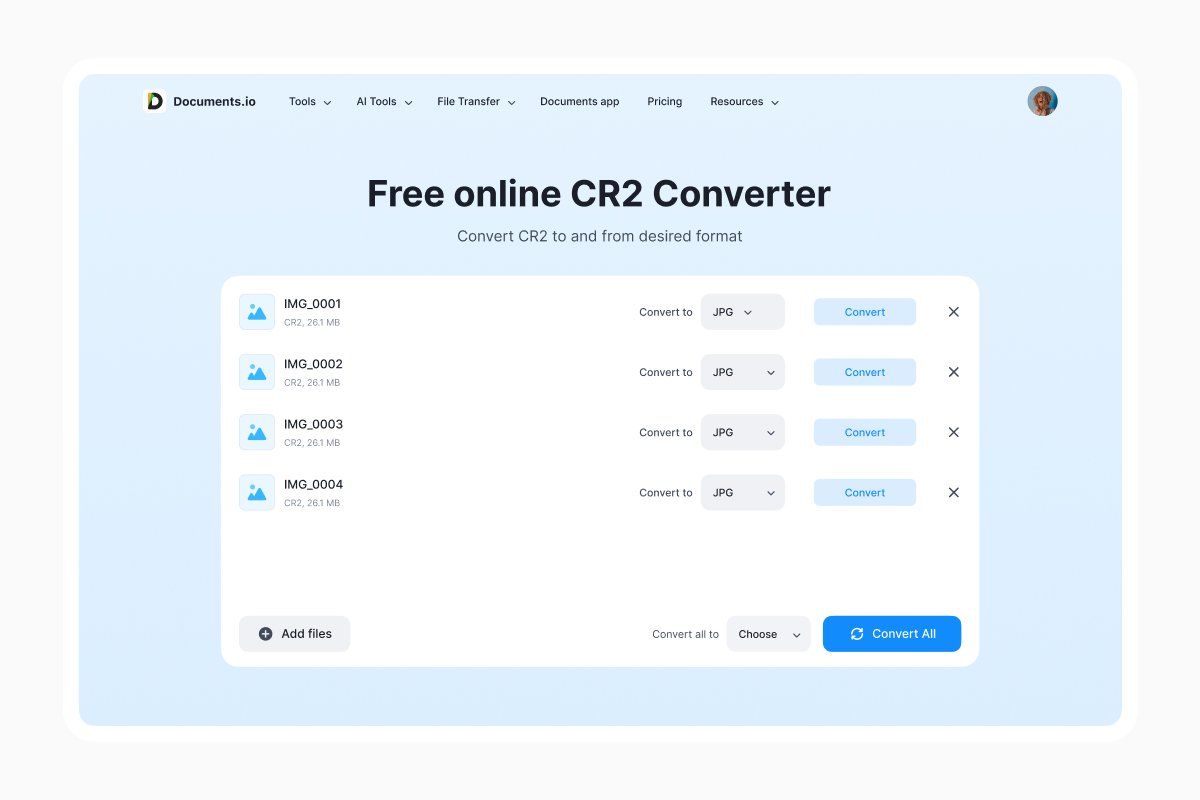
You can also use Documents.io to convert your files from CR2 to JPG. With a built-in converter, the website allows you to convert for free up to 10 files.
When a CR2 won’t open
Your camera may be newer than your software. Raw support is added model by model, so a body released last spring might not be recognized by an editor you installed two years ago. Update your software or convert the files with Adobe’s free DNG Converter, which changes your raw files into a format that can be read by all.
Another case when CR2 won’t open is being a CR3. Before you start troubleshooting the wrong format, verify the extension.
Perhaps the transfer could have been interrupted. A CR2 copied from a card that got yanked mid-write is usually unrecoverable. Copy it again from the original card if you still have it.
You might be using a viewer, not an editor. A lot of image apps just show the embedded JPEG preview and nothing else, and that can appear as partial support. If you can open the file but nothing responds to editing, that’s what’s happening.
The camera, of course, captured more than it showed you. That’s the whole reason the format exists and it’s why the file that seems like clutter today is the one you’re going to want in five years when you finally find out what to do with it.
FAQ
What does CR2 stand for?
Canon Raw version 2. It replaced Canon’s earlier CRW format in 2004 and was itself replaced by CR3 in 2018.
Is CR2 the same as raw?
CR2 is one kind of raw file, Canon’s. Nikon writes NEF, Sony writes ARW, Fujifilm writes RAF, and Adobe’s DNG is an attempt at a universal version.
Can I edit a CR2 file directly?
Not in the sense of writing changes into it. Raw editors store your adjustments separately and leave the original data alone, which is why you can undo anything years later. To produce a file you can actually use, you export a JPEG or TIFF.
Why do my CR2 photos look worse than the JPEGs?
Because they haven’t been processed yet. The camera applies contrast, saturation, and sharpening to JPEGs and skips all of it for raw. That flat, dull starting point is the raw file handing you the decisions instead of making them.
Can I convert a CR2 back into a raw file?
No. Once it’s a JPEG, the extra data is gone. This is the single best argument for not deleting the originals.
Latest posts
Glossary
What is a DCM file, and how do you open one?
DCM files are commonly used to store medical images such as X-rays, CT scans, and MRIs. Discover what DCM files are, how they work, and which tools you can use to open and view them.

Glossary
What is a FLAC file? The lossless audio format explained
FLAC is a lossless audio format that preserves original sound quality while reducing file size. Discover how FLAC files work, how they compare to MP3, and how to open, play, or convert them on different devices.

Glossary
What is an AVI file, and how do you open, play, or convert one?
AVI is a video file format developed by Microsoft and widely used for storing video and audio. Discover how AVI files work, how to open and play them on different devices, and how to convert them to modern formats like MP4.