


When you need to turn a high-res image into a smaller JPEG, or switch a Word document to a PDF in a pinch, the first thing you do is hit Google for an online file converter. They are fast, free, and require zero software installation.
But a little voice in the back of your head starts to whisper: "Wait, is this random website about to steal my corporate presentation or infect my machine with malware from file converters?"
It’s a fair question, and one you need to take seriously. While some older advice suggests avoiding all online converters like the plague, that's an oversimplification. The reality is that the internet is filled with both shady alleyways and well-lit, secure institutions. The key is knowing how to distinguish between them and using the right tool for the job.
So is it safe to use online file converters? Yes, provided you follow a strict set of rules and stick to reputable, professional services that prioritize secure file conversion. Think of it less as a free-for-all buffet and more as choosing a highly rated, transparent business partner.
The Two Biggest Concerns
When people ask if online converters are safe, their worries usually fall into two main categories: what happens when you upload the file, and what happens when you download the converted file.
Concern 1: Privacy and Data Theft
This is the most common worry: Can online converters steal my data?
When you upload a file like a tax document, a customer list, or a proprietary design, it briefly sits on the converter's server to be processed. If the service is malicious or poorly secured, that file could be scraped for sensitive information, leaked in a data breach, or even sold. This is why you hear warnings about online file converter privacy risks.
How a Trusted Online Converter Protects You:
TLS/SSL Encryption (The Lock Icon): This is non-negotiable. Look for the padlock icon in your browser's address bar, confirming the site uses TLS encryption (formerly SSL). This ensures that the file is encrypted (jumbled up) during its journey from your computer to their server, preventing eavesdropping.
Strict Deletion Policies: Reputable converters make their money through paid subscriptions or API services, not by selling your data. They explicitly state in their privacy policy exactly how long your file is stored and when it's deleted. The best services delete both the uploaded and converted file automatically, often within minutes or an hour of conversion.
Look for clear statements like: "All files are automatically deleted from our servers after 60 minutes."
Concern 2: Malware and Ransomware
The second major threat comes when you download the converted file. Shady sites have been known to attach malicious payloads to your download, using the tool as a vector for malware from file converters.
How a Trusted Service Ensures Download Safety:
File Integrity: A legitimate converter only modifies the content to change its format (e.g., changing the structure of a DOCX to a PDF). A bad actor might wrap the converted file in an executable wrapper (.exe), a batch file (.bat), or a password-protected zip file containing malware.
Trust the Extension: If you upload a .doc and ask for a .pdf, but the download link is a .zip or .exe, do not click it. A secure file conversion process should deliver the exact file extension you requested.
Third-Party Vetting: Look for services that are ISO 27001 certified or have clear partnerships. Companies that invest in enterprise-level security protocols and offer a paid, business-focused service tier have a vested interest in maintaining a clean, secure environment.
How to Identify a Trusted Online Converter
Don't just choose the first result in Google. Use this quick checklist to vet any service before you click 'Upload.'
Secure Converter Checklist
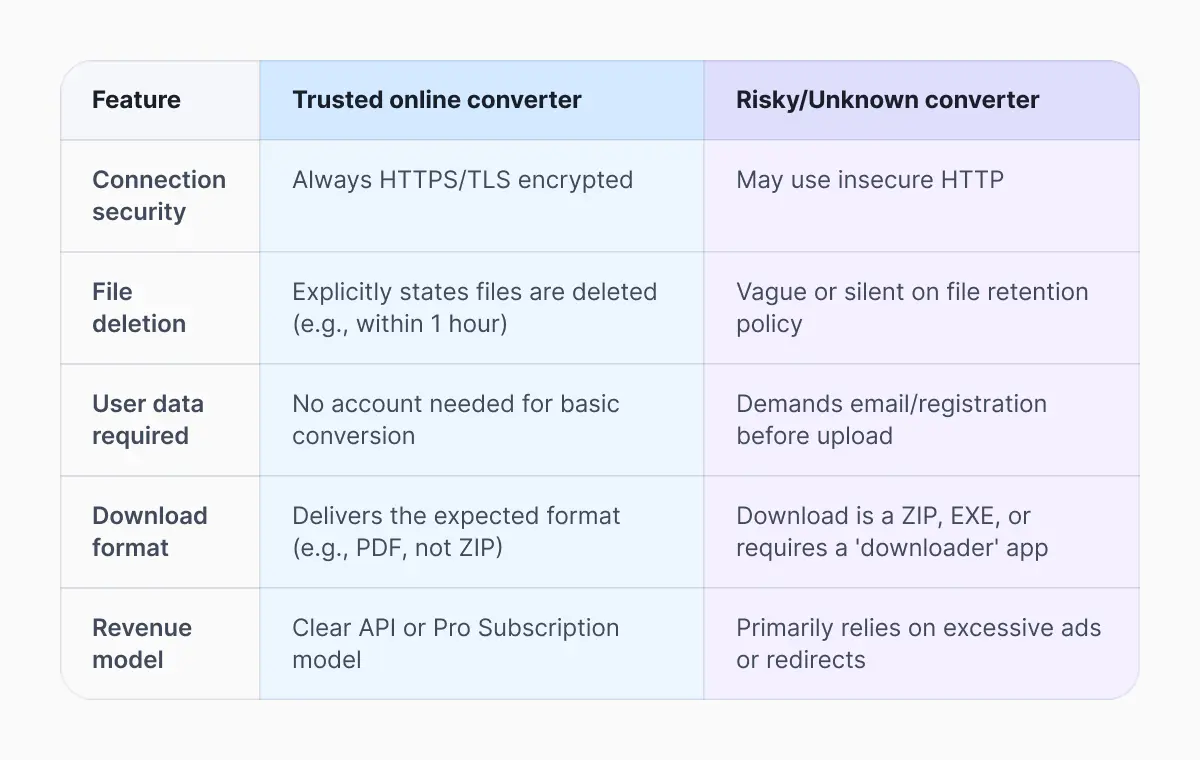
You can trust a service if it meets most of these criteria:
HTTPS is Always Active: Check the URL bar for the padlock and https://.
Clear Privacy Policy: The policy must be easy to find, easy to read, and explicitly state that your files are not stored permanently and not shared or sold.
Established Reputation: The service has been around for several years and is consistently mentioned on reputable tech sites (like this one) as a trusted online converter.
No Unnecessary Data Harvesting: The service doesn't require registration or credit card details for a basic, single conversion.
Visible Contact Information: They should provide clear, professional contact details (support email, physical address) on their site—not just a generic form.
Professional Look (But Be Wary): While professional design is a good sign, remember that scammers can mimic polished websites. Combine this with the other checks, don't rely on looks alone.
Software vs. Online Tools
Now we get to the classic dilemma: Should I download software instead?
For many users, downloading software is a perfectly valid and often safer alternative, particularly if you're dealing with vast amounts of sensitive or confidential files.
The Case for Desktop Software
Maximum Privacy: When you use desktop software, the conversion happens on your own device. The file never leaves your controlled environment, eliminating all upload safety risks.
Consistency and Control: You control the version, the security updates, and the access permissions.
The Case for Online Services
However, the reality of modern life means desktop software isn't always the right choice:
Platform Independence: Online converters work perfectly on a Chromebook, a shared workstation, or a smartphone, where installing software may be impossible.
Exotic Conversions: Your installed software might convert DOCX to PDF, but it won't handle converting a .heic photo to a .tiff or a .vob video to a .mp4. Online file converters often support thousands of niche formats that no single piece of desktop software can match.
Low Barrier to Entry: For the casual user who needs to convert one file a year, downloading and paying for a full software suite is overkill. A trusted online converter is the efficient answer.
The ultimate choice should be based on a simple rule: the sensitivity of the file.
Sensitive Files: Use local, desktop software or secured, paid enterprise cloud platforms like Documents.io app, Adobe Acrobat or Microsoft 365, which have signed data processing agreements.
Non-Sensitive Files): A trusted online converter is the fastest and most convenient solution, provided you follow the security checklist above.
The modern internet doesn't require you to sacrifice speed for safety. By understanding the core risks and learning to quickly vet an online file converter privacy policy, you can take advantage of the convenience of these powerful tools while keeping your data secure.
To streamline your workflow and handle multiple formats in seconds, explore all the Converters available with Documents, for a faster and secure way to transform your media, documents, and images.
Latest posts

Knowledge Base
Video file formats explained: MP4, MKV, AVI and more
Learn the difference between video file formats (MP4, MKV, AVI, MOV, WebM) and codecs (H.264, H.265, AV1). Find out which format is best for social media, professional editing, and universal compatibility in 2026.

Knowledge Base
The beginner photographer’s guide to file conversion (RAW, JPEG, TIFF, PNG)
A beginner-friendly guide to converting RAW, JPEG, TIFF, and PNG photos. Learn quality tradeoffs, export settings, and smart archiving habits for web and print.

Knowledge Base
How to make a GIF: simple steps to create and share loops online
Making a GIF is simple: trim a short moment from a video, convert it, and save the loop. Whether you’re using a browser-based converter like Documents.io or an app, the key is to keep it short, clean, and seamless for easy sharing anywhere.