


Documents has always been about helping you do more with your files. Your files should be easy to manage, easy to move, and always within reach.
Over time, we’ve added many tools to support that idea. Some became part of everyday workflows. Others found their place in more specific use cases.
As the app grows, we keep asking the same question. Does every feature still earn its place?
In the next update, we’re making a small change to stay true to that principle. A small but important change to keep Documents focused on what matters most.
What’s changing
We’ll be removing a few features from the app. Delete Large Videos, Clean Up Screenshots, and Markup will be removed from Documents.
These features have been part of the app for some time. They solved real problems, but no longer fit the current direction of the app.
At the same time, they continue to add weight. More code to maintain. More space taken on your device. More complexity behind the scenes.
These features will no longer be available moving forward.
A focus on what matters most
When we think about improving Documents, it’s not just about adding more. It’s also about knowing what to simplify.
By stepping back and removing what’s no longer essential, we can make Documents:
- Lighter to download and store
- Faster to open and use
- Easier to maintain and improve over time
This helps us focus our efforts where they make the biggest difference. We make space for what matters most.
What this means for Documents
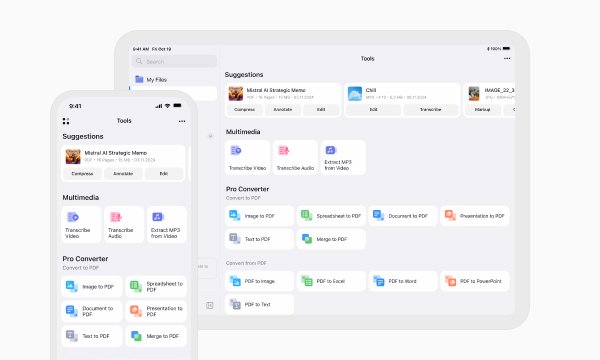
Documents will continue to be your central place to manage files, read documents, convert formats, and organize everything in one place.
If you’ve used these features before, you’ll notice they’re no longer part of the app after updating.
There are no direct replacements inside Documents for these tools.
In many cases, similar actions are already handled by your device. For example, managing screenshots or cleaning up storage is often built directly into your system.
Every feature in Documents should serve a clear purpose. This change is not about removing functionality. It is about making sure every part of Documents is intentional.
- It should be useful in everyday workflows
- It should fit naturally into the experience
- It should justify the space it takes in the app
Sometimes, improving a product means choosing what not to carry forward.
Looking ahead
This update is part of a broader effort to keep Documents fast, reliable, and focused. We’ll continue refining Documents with the same goal: making it the most reliable place to work with your files. That means investing in performance, improving existing tools, and building new features that fit naturally into your workflow without adding unnecessary weight.
This update is a small step in that direction.
Thanks for being part of the journey.
Latest posts

What's new
Documents is now backed by ISO 27001-certified security
Documents is now backed by ISO 27001-certified security, giving you even greater confidence that your files and data are protected by internationally recognized security practices.
What's new
Documents is ready for iOS 27: bigger widgets, smarter Shortcuts, and Siri
Get more done with Documents on iOS 27. See more from your Home Screen, automate file tasks with upgraded Shortcuts, and use Siri to work with your files.

What's new
Smart Insights: understand any file in one tap
Instantly analyze and break down any document with Smart Insights. Get key takeaways, summaries, and instant file understanding in just one tap.