


Want to save the audio from a video on your iPhone? Whether you're turning a lecture into a podcast, saving a speech to listen to later, or extracting music from a video you own, you can convert a video's audio into an MP3 file in just a few taps.
With Documents by Readdle, you can extract audio from videos stored on your iPhone, in the Files app, or in cloud storage—without modifying the original video.
Why extract audio from a video?
Extracting audio lets you:
- Listen to lectures or interviews without watching the video.
- Save speeches or presentations as audio files.
- Create podcasts from recorded videos.
- Free up storage by keeping only the audio when you no longer need the video.
- Listen offline while commuting, exercising, or traveling.
How to extract audio from video on iPhone
Documents makes it easy to convert the audio track from a video into an MP3 file.
- Download Documents by Readdle and open the app.
- Tap the + button to import your video.
- Choose a video from the Photos app, Files, iCloud Drive, Google Drive, Dropbox, or another cloud storage service.
- Open the video.
- Tap the More (⋯) button.
- Select Extract Audio.
- Choose Extract MP3 File.
- Tap Show in My Files to open your new audio file.
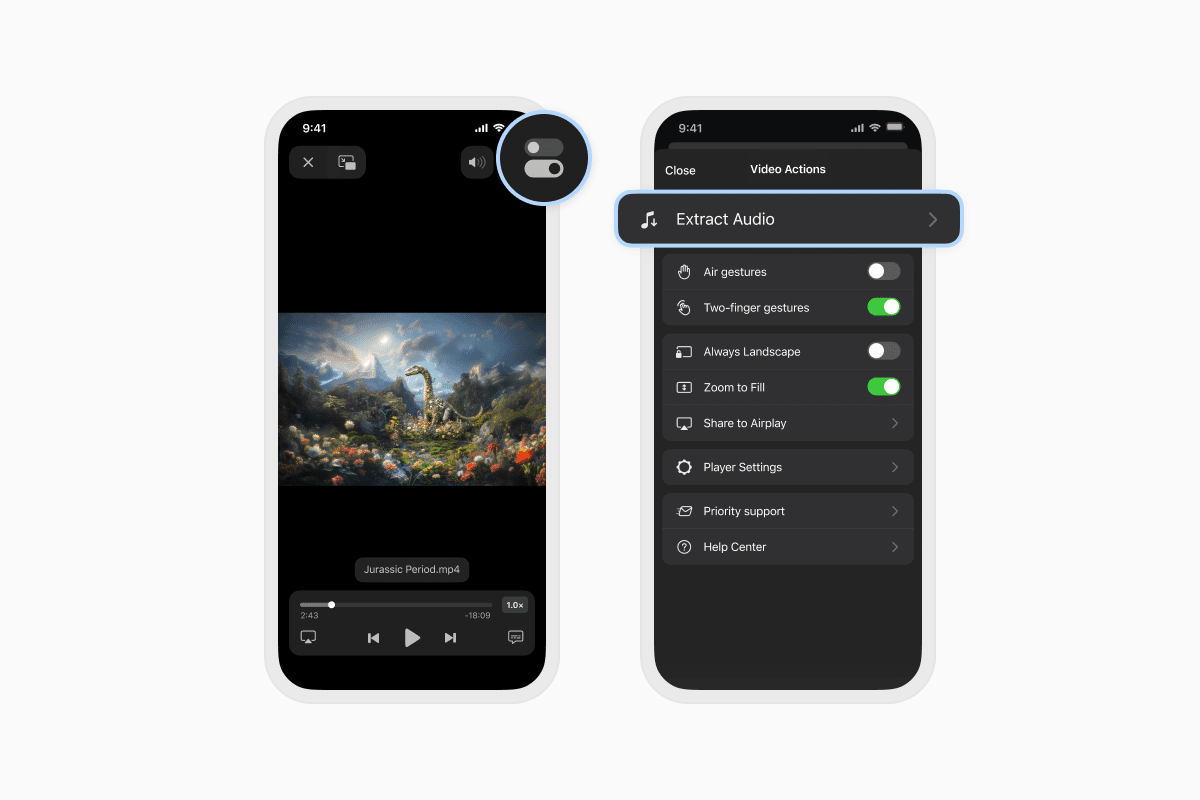
Your original video remains unchanged, while the extracted MP3 is saved separately in Documents.
Which video formats are supported?
Documents supports audio extraction from most video formats it can open, including:
- MP4
- MOV
- MKV
- AVI
If the video plays in Documents, you can usually extract its audio.
Where is the extracted audio saved?
After the conversion is complete, your MP3 file appears in My Files inside Documents.
From there you can:
- Play the audio.
- Rename the file.
- Move it into folders.
- Upload it to iCloud Drive, Google Drive, Dropbox, OneDrive, and other cloud services.
- Share it with friends or colleagues.
Frequently asked questions
Does extracting audio change the original video?
No. Documents creates a new MP3 file while leaving the original video untouched.
Is audio extraction free?
Audio extraction is available with a Documents Plus subscription.
Documents Plus also includes advanced tools for editing PDFs, converting files, organizing documents, and much more.
Which videos can I convert?
You can extract audio from videos stored on your iPhone, imported from the Files app, or downloaded from supported cloud storage services.
Convert videos to MP3 in seconds
Whether you're saving a lecture, an interview, a presentation, or a personal recording, Documents makes it easy to extract audio from videos on your iPhone while keeping your original file intact.
Download Documents by Readdle for free and manage, convert, and organize all your files from one place.
Latest posts

How-Tos
How to download and play MP3 music on iPhone for free
Learn how to download your favorite mp3 music from the internet or from your computer to your iPhone and play it for free using the Documents app.
How-Tos
How to sync iPhone and iPad
If you’re wondering, “How do you sync iPhone & iPad without iCloud?” don’t worry! This guide explains how to set up two-way synchronization between iOS devices.
How-Tos
How to save audio files on iPhone: full guide
Download audio files to your iPhone in just a few taps. Learn how to save music, podcasts, and other audio with Documents, where to find your downloads, and how to organize them for offline listening.