


Keeping your files organized makes it much easier to find important documents, photos, videos, and downloads on your iPhone. Whether you're managing work files, school projects, or personal documents, creating folders helps keep everything in the right place.
You can create folders using Apple's built-in Files app, but if you regularly work with documents or cloud storage, Documents by Readdle offers a more complete file management experience. It lets you organize files, connect cloud services, move documents with drag and drop, and customize folders—all from one app.
Why create folders on iPhone?
Creating folders helps you:
- Organize work and personal files.
- Keep downloaded documents in one place.
- Group photos, videos, and PDFs by project or trip.
- Find important files faster.
- Reduce clutter in your file library.
Whether you use Files or Documents, folders make managing your iPhone much easier.
How to create a folder in Documents
Documents by Readdle is a free file manager that makes creating and organizing folders simple.
Create a new folder
- Download Documents by Readdle from the App Store and open the app.
- Tap the + button at the bottom of the screen.
- Select Create Folder.
- Enter a name for your folder.
- Tap Done.
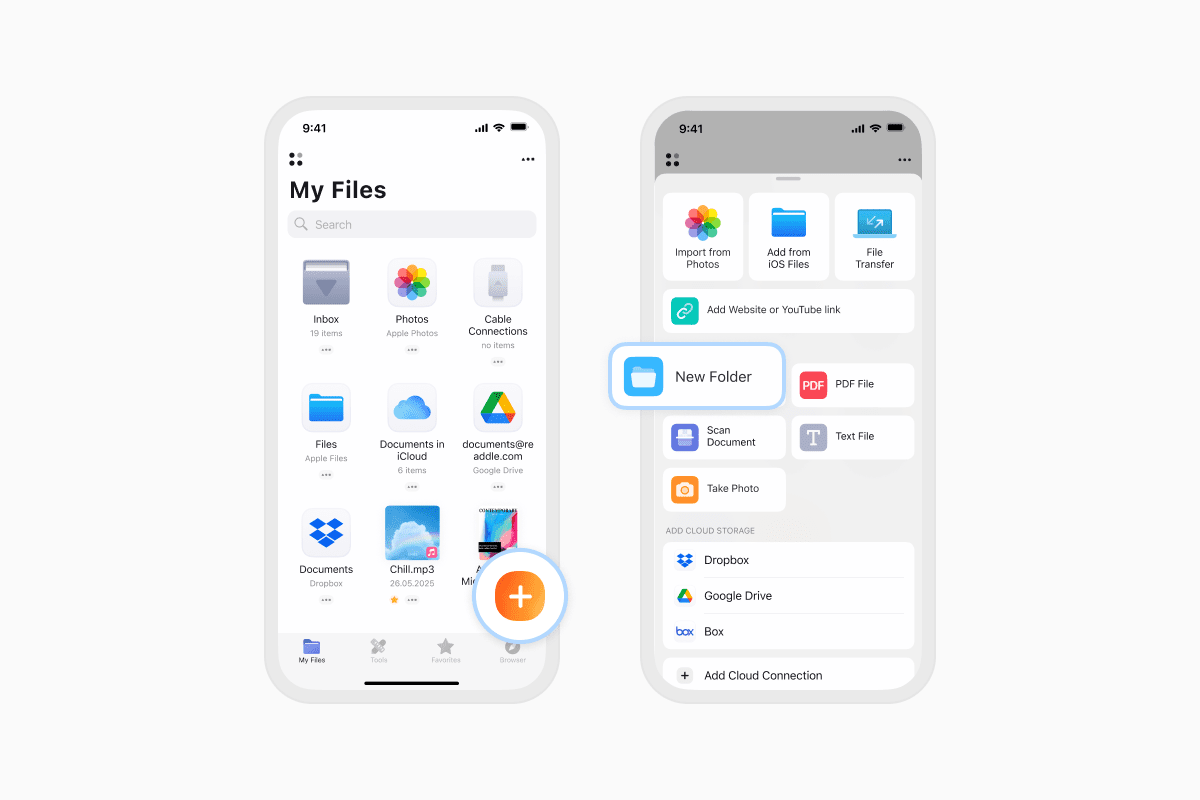
Your new folder is now ready to store documents, photos, videos, PDFs, ZIP archives, and more.
Organize files with folders
Documents also makes it easy to keep everything organized.
- Move files: Drag and drop files into any folder.
- Create a folder from existing files: Drag one file onto another to automatically create a new folder.
- Create subfolders: Open any folder, tap +, and create another folder inside it.
This makes it easy to organize projects, travel documents, receipts, school files, or anything else you want to keep together.
How to create a folder in the Files app
You can also create folders using Apple's built-in Files app.
- Open the Files app.
- Navigate to the location where you want the folder, such as iCloud Drive or On My iPhone.
- Tap the More (⋯) button.
- Select New Folder.
- Enter a folder name.
- Tap Done.
Your new folder is now available in the selected location.
Frequently asked questions
Can you create a folder inside another folder on iPhone?
Yes. Both Documents and the Files app support nested folders (also called subfolders).
Simply open the parent folder before creating a new one.
What files can you put in a folder?
You can organize almost any type of file, including:
- PDFs
- Word documents
- Excel spreadsheets
- PowerPoint presentations
- Photos
- Videos
- Audio files
- ZIP and RAR archives
- Downloads
- Text files
Folders make it easier to keep related files together, regardless of their format.
Can you move files between folders?
Yes. In both Documents and the Files app, you can move files into different folders whenever you need to reorganize your library.
Documents also supports drag-and-drop, making it even faster to organize multiple files.
Can you color-code folders?
Yes. Documents lets you assign color labels to folders so they're easier to identify at a glance.
To add a color:
- Tap the More (⋯) button on a folder.
- Select Highlight with Color.
- Choose the color you want.
Color labels are a simple way to separate work, personal files, travel documents, or ongoing projects.
Organize your files more efficiently
Whether you're managing work documents, school files, travel plans, or personal photos, creating folders is one of the easiest ways to keep your iPhone organized.
With Documents by Readdle, you can create folders, connect cloud storage, organize files with drag and drop, color-code important folders, and manage everything from one place.
Download Documents by Readdle for free and keep all your files organized and easy to find.
Latest posts

How-Tos
How to download and play MP3 music on iPhone for free
Learn how to download your favorite mp3 music from the internet or from your computer to your iPhone and play it for free using the Documents app.
How-Tos
How to sync iPhone and iPad
If you’re wondering, “How do you sync iPhone & iPad without iCloud?” don’t worry! This guide explains how to set up two-way synchronization between iOS devices.
How-Tos
How to save audio files on iPhone: full guide
Download audio files to your iPhone in just a few taps. Learn how to save music, podcasts, and other audio with Documents, where to find your downloads, and how to organize them for offline listening.